Developer Guide
Principles
- prepare KSQL or Spark sources with multiple statements in them, as separate DDLs or/and DMLs
- Still keep the source as part of the context.
- Assign different rules for different scope
Components
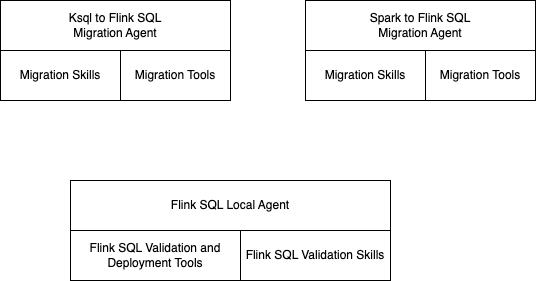
flink-skill-common
The role of this component is to process the generated Flink SQL with static analysis or deployment using Confluent Cloud for Flink REST API and to offer a set of common tools, used for migration.
| Important Features | Code | Principles |
|---|---|---|
| Centralize configuration, logs, load ,env | config.py | Common skill and specific skill loading |
| Factory to build agno agents | agents.factory.py | |
| Agent for fixing Flink SQL syntax validation and deployment failures. | cc_deployment_fixer.py | Use syntaxic parser, confluent cloud statement deployment and LLM to fix the error and save results to target folder |
- Unit tests without backends
- For integration tests, be sure the LLM server is reachable.
ksql-to-flink CLI migrate flow
The ksql-flink-migrate command (cli.py) migrates one CREATE statement at a time.
But it can load a file with multiple create tables or streams and with some DML logic. If so, it will split the files in multiple separate files with a manifest to track the migration process.
└── terminal_history.statements
        ├── 001_SHIP_REFERENCES.ksql
        ├── 002_SHIP_DETAILS.ksql
        └── manifest.json
Cli is reentrant and resumes from the file in the manifest where the source SHA is changed.
  "statements": [
    {
      "index": 1,
      "name": "ship_refs",
      "file": "001_SHIP_REFERENCES.ksql",
      "table": "shit_refs",
      "status": "migrated",
      "error": null,
      "updated_at": "2026-07-21T02:07:19.104550+00:00"
    },
sequenceDiagram
    actor User
    participant CLI as migrate (cli.py)
    participant Progress as ProgressReporter
    participant LLM as LLM server
    participant Manifest as migration_manifest
    participant Utils as ksql_utils
    participant Agent as run_migration
    participant Conv as clean_flink_sql_and_validate
    participant FS as out_dir / statements_dir

    User->>CLI: migrate --file .ksql [--table] [--out-dir] [--skip-deploy]
    CLI->>Progress: banner (model, fixer, deploy mode)
    CLI->>CLI: assert file exists
    CLI->>LLM: llm_reachable()
    LLM-->>CLI: ok
    CLI->>FS: read source .ksql text

    alt source SHA matches existing manifest
        CLI->>Manifest: try_load_matching_manifest()
        Manifest-->>CLI: manifest + statements_dir (resume)
    else new or changed source
        CLI->>Utils: split_ksql_create_statements()
        Utils-->>CLI: CREATE STREAM/TABLE list
        CLI->>Manifest: init_or_load_manifest()
        Manifest->>FS: write statement_N.ksql + manifest.json
        Manifest-->>CLI: manifest + statements_dir
    end

    CLI->>Manifest: pending_entries(manifest)
    Manifest-->>CLI: entries not yet migrated

    loop each pending statement
        CLI->>FS: read_statement_sql(entry)
        CLI->>Utils: clean_ksql_input()
        CLI->>Manifest: update_status(in_progress)
        CLI->>Progress: header [i/n] name → table

        CLI->>Agent: run_migration(table, cleaned ksql, src context)
        Agent-->>CLI: agent response (DDL/DML JSON text)
        CLI->>Progress: agent_event(response)

        CLI->>Conv: clean_flink_sql_and_validate(response, table, skip_deploy, out_dir)
        Note over Conv: offline sqlglot → optional agent fixer → optional CC deploy
        alt success (or DDL-only, no DML)
            Conv-->>CLI: ConvergenceResult success / None
            Conv->>FS: write ddl.{table}.sql, dml.{table}.sql
            CLI->>Manifest: update_status(migrated)
        else validation or deploy failed
            Conv-->>CLI: ConvergenceResult failure
            CLI->>Manifest: update_status(failed, error)
            CLI-->>User: exit 1
        end
    end

    CLI-->>User: Done. Processed N statement(s). Output: out_dir
Processing flow for Flink SQL validation
sequenceDiagram
    participant Loop as converge_flink_sql
    participant Offline as sqlglot
    participant Agent as LLM_agent
    participant Remote as CC_Flink
    participant Deploy as deploy_table

    Loop->>Offline: attempt 1
    Offline-->>Loop: DML error INSRT
    Loop->>Agent: fix offline errors
    Agent-->>Loop: corrected DML
    Loop->>Offline: attempt 2
    Offline-->>Loop: pass
    Loop->>Remote: validate_statements_remote
    Remote-->>Loop: DDL invalid format
    Loop->>Agent: fix remote errors
    Agent-->>Loop: corrected DDL
    Loop->>Offline: attempt 3
    Offline-->>Loop: pass
    Loop->>Remote: pass
    Loop->>Deploy: deploy_table
    Deploy-->>Loop: success