Lab: Migration using AI
The current AI based migration implementation supported by this tool enables migration of:
- Spark SQL to Flink SQL
- ksqlDB to Flink SQL
The approach uses LLM agents local or remote. After this lab you should be able to use the migration-to-flink tools to partially automate your SQL migration to Flink SQL.
The core idea is to leverage LLMs and parser tools to understand the source SQL semantics and to translate them to Flink SQLs.
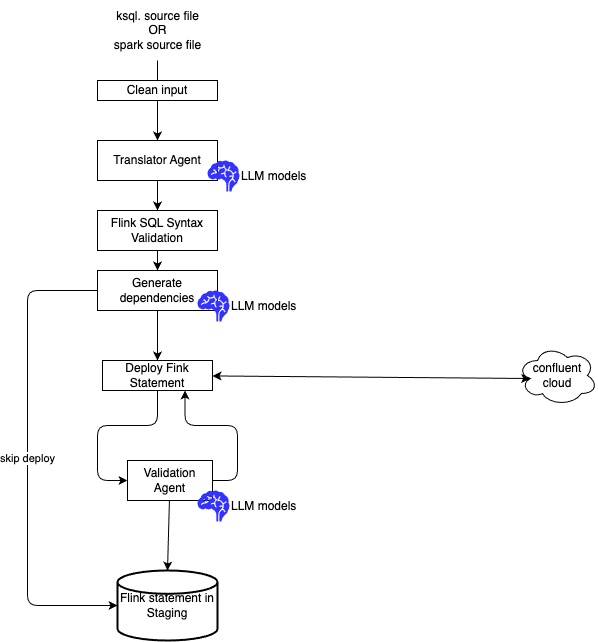
And validate with Confluent Cloud deployment.
This github repository is not production ready, the LLM can generate hallucinations, and one to one mapping between source like ksqlDB or Spark to Flink is sometime not the best approach. We expect this agentic solution will be a strong foundation for better results, and can be enhanced over time.
Migration is a one time shot, and should not be a practice to develop Flink solution.
Lab Environment
The Lab was developed and tested on Mac M3 and M5.
Prerequisites
Be sure to have done the Setup Lab and Setup script to get different CLIs operational and generate Cursor/Claude skill variants from the canonical Agno skill/ directories.
Different runtimes
The goal is to try to limit cost and expose logic to SaaS LLM inference. For that smaller model, open weights, can be run locally to computer with at least 32GB of memory. Specially the Mac with their memory architectyure share with GPUs.
Running local, leverages Agno framework. Skill are defined to be adapted if user wants to use Claude Code or Cursor.
Agno harness (CLI) — translation and validation run via Python agents and ksql-flink-migrate / spark-flink-migrate CLIs. The harness loads skill/SKILL.md directly. Flink SQL validation uses flink-skill-validate or skill scripts under flink-skill-common/skill/scripts/.
Cursor (IDE) — skills under .cursor/skills/ are generated with MCP-oriented instructions. You (the IDE assistant) translate SQL using the skill rules. Validation and deploy use the flink-skill-common MCP server (validate_flink_sql_offline, create_flink_statement, etc.). Do not run ksql-flink-migrate or spark-flink-migrate in the IDE workflow.
Claude Code (IDE) — skills under */.claude/skills/. You translate SQL using the skill rules. Validation uses flink-skill-validate CLI or bundled validate_offline.py scripts. Deploy uses the flink-skill-common MCP server when configured (flink-skill-mcp). Do not run Agno migration CLIs for IDE translation.
After editing any canonical skill/SKILL.md, run ./scripts/adapt-skills.sh --target cursor and/or ./scripts/adapt-skills.sh --target claude before using IDE workflows.
Setup
Assume Setup Lab has already run (./scripts/setup.sh). This script generates Claude and Cursor skills, copied under each package's .claude/skills/ or .cursor/skills.
- When skills are modified in one of the following sources
| Skill file | Role |
|---|---|
| flink-skill-common/skill/validate-flink-sql/SKILL.md | Used with tools to deploy a fink statement to Confluent Cloud and fix issues with Agent |
| flink-skill-common/skill/source-ddl/SKILL.md | It is possible that a statements fails because dependent tables are not present in Confluent Claude, this skill helps LLM to find the definition of those tables and create DDL for testing. |
| ksql-to-flink-skill/skill/SKILL.md | Specific for ksql to flink sql migration |
Claude Code integration
This section covers two skill scopes: Flink SQL validation and ksqlDB to Flink migration. Skills provide agent playbooks; CLIs run deterministic checks and translation.
| Scope | Skill | Package | Generated Claude path |
|---|---|---|---|
| Flink SQL validation | /validate-flink-sql | flink-skill-common | flink-skill-common/.claude/skills/validate-flink-sql/ |
| ksqlDB to Flink migration | /ksql-to-flink | ksql-to-flink-skill | ksql-to-flink-skill/.claude/skills/ksql-to-flink/ |
| spark SQL to Flink migration | spark-to-flink-skill | spark-to-flink-skill/.claude/skills/spark-to-flink/ |
Commands
Ksql to Flink
- Get the last CLI documentation
- Migrate ksql statements included in one file, without Confluent Cloud deployment:
Scope 1: Flink SQL validation
Happy path
Use when you already have Flink DDL and/or DML and need syntax checks or convention fixes, and deployment using Confluent Cloud.
CLI (from repo root):
cd flink-skill-common/harness && uv sync --extra dev

uv run flink-skill-validate offline \
  --ddl ../../references/flink/valid/raw_classical_songs/ddl.raw_classical_songs.sql \
  --dml ../../references/flink/valid/raw_classical_songs/dml.raw_classical_songs.sql
The CLI prints JSON with "ok": true/false and an issues array. Exit code 0 means pass; 1 means validation errors.
Claude Code
Start claude code under the references/flink folder.
Load the
validate-flink-sqlskill. Runflink-skill-validate offline. on the Flink SQL in valid/filtering/ . If validation fails, apply the skill rules, write corrected SQL, and re-run untilokis true.
You should get a response like:
Validation passed on the first run — no fixes needed.

Result:
{
  "ok": true,
  "issues": [],
  "error_count": 0
}

I loaded the validate-flink-sql skill and ran flink-skill-validate offline on the two Flink SQL files in valid/filtering/:

- ddl.filtered_pub.sql — CREATE TABLE filtered_publications (has PRIMARY KEY ... NOT ENFORCED, DISTRIBUTED BY HASH(book_id), and standardized connector properties)
- dml.filtered_pub.sql — INSERT INTO filtered_publications ... SELECT ... WHERE author = 'George R. R. Martin'

Both are syntactically valid per the offline (sqlglot Flink-dialect) check: ok is true with zero issues. No corrections were required, so no re-run was needed. These files live under valid/, so passing is the expected outcome.
Invalid DML or DDL
Validate broken DML from references/flink/invalid/dml_bad_syntax/ (contains an INSRT INTO typo):
CLI
cd flink-skill-common/harness
uv run flink-skill-validate offline --dml ../../references/flink/invalid/dml_bad_syntax/dml.sql
Expected: exit code 1 and a json like:
{
  "ok": false,
  "issues": [
    {
      "statement_index": 0,
      "kind": "dml",
      "message": "DML must start with INSERT INTO",
      "line": null,
      "severity": "error"
    }
  ],
  "error_count": 1
}
Claude Code
Follow-up: Ask Claude to fix the DML using validate-flink-sql rules and re-run validation until it passes.
you should get something like:
Validation failed — as expected for this invalid/ fixture.

File: invalid/dml_bad_syntax/dml.sql
INSRT INTO raw_classical_songs(artist, title) VALUES ('Test Artist', 'Test Title');

Result:
{
  "ok": false,
  "issues": [
    {
      "statement_index": 0,
      "kind": "dml",
      "message": "DML must start with INSERT INTO",
      "line": null,
      "severity": "error"
    }
  ],
  "error_count": 1
}

Assessment: The statement's keyword is misspelled — INSRT instead of INSERT — so the validator rejects it as not starting with INSERT INTO. The corrected form would be:

INSERT INTO raw_classical_songs (artist, title) VALUES ('Test Artist', 'Test Title');

Since this lives under invalid/ (a negative test fixture meant to fail), I've left it unchanged and only reported the finding. Let me know if you'd like me to write the corrected version somewhere.
Alternative invalid fixture
For validating a DDL syntax error instead, use references/flink/invalid/ddl_bad_syntax/ddl.sql with --ddl only. Expect "kind": "ddl" in the issues.
Deploy failure fix loop
Use when Flink SQL is deployed to Confluent Cloud and a statement fails or is unhealthy. The host assistant performs the fix loop using the validate-flink-sql skill — not the Agno FlinkSqlDeployFixerAgent.
Requires FLINK_* credentials in repo .env and MCP enabled (Cursor) or flink-skill-mcp configured (Claude Code).
Cursor
Load
validate-flink-sql. For failed statement{table}-dml, call MCPget_flink_statement_exceptions, fix DDL/DML using skill rules, re-validate withvalidate_flink_sql_offline, then redeploy source DDLs, target DDL, and target DML.
Claude Code
Load
validate-flink-sql. Call MCPget_flink_statement_exceptionson the failed statement. Fix SQL using skill rules, runflink-skill-validate offline, then redeploy via MCPcreate_flink_statementandwait_flink_statement_phase.
Workflow:
get_flink_statement_exceptionson the failed statement name.- Apply
validate-flink-sqlrules; updateddl.{table}.sql,dml.{table}.sql, andtests/ddl.*.sqlstubs if needed. - Re-validate (
validate_flink_sql_offlineorflink-skill-validate offline). - Redeploy in order: source stub DDLs → target DDL → target DML.
check_flink_statement_healthon DML; repeat until success or you stop.
Do not set AGENT_FIXER_EXECUTION_ENABLED or invoke Agno harness CLIs for IDE fixes.
Scope 2: ksqlDB to Flink migration with CC validation
Use when converting ksqlDB CREATE STREAM / CREATE TABLE scripts to Flink DDL and DML.
The references/ksql/sources/routing includes the following ksql from the Confluent.io tutorial:
├── references/ksql/sources/routing
│   ├── deduplicate.ksql
│   ├── filtering.ksql
│   ├── merge.ksql
│   └── splitting.ksql
CLI translation only
- Be sure to be in the ksql-to-flink-skill folder
-
Run a migration for a unique table without CC deployment and validation.
-
Run a migration with a file containing multiple ksql statements, with deployment to CC
Agno harness: translation and deployment with fixer agent
Requires AGENT_FIXER_EXECUTION_ENABLED=1 in .env and a reachable LLM (SL_LLM_*).
AGENT_FIXER_EXECUTION_ENABLED=1 uv run ksql-flink-migrate \
  --table dim_all_songs \
  --file ../../references/ksql/sources/routing/merge.ksql \
  --out-dir ../../staging/ksql-lab-out
This invokes FlinkSqlDeployFixerAgent (Agno) on validation or deploy failure — not the Cursor/Claude IDE workflow.
Claude Code
From the references folder, enter a prompt like:
Load the
ksql-to-flinkskill. Migrateksql/sources/routing/deduplicate.ksqlfor tabledetected_clicks. Writeddl.detected_clicks.sqlanddml.detected_clicks.sqlunderstaging/ksql-lab-out/. Then validate withflink-skill-validate offline.
Workflow:
- Apply
ksql-to-flinktranslation rules yourself (do not runksql-flink-migrate). - Write
ddl.{table}.sqlanddml.{table}.sqlunder the output directory. - Run
flink-skill-validate offlineon the outputs (or MCPvalidate_flink_sql_offlinein Cursor). - On errors, follow the
validate-flink-sqlfix loop (apply rules, re-validate). - Optional deploy: MCP tools from
flink-skill-common(create_flink_statement, etc.) when Flink credentials are configured. On deploy failure, follow the same fix loop (Scope 1).
Cursor
Load the
ksql-to-flinkskill. Migrateksql/sources/routing/deduplicate.ksqlfor tabledetected_clickstostaging/ksql-lab-out/. Validate with MCPvalidate_flink_sql_offline.
Same workflow as Claude Code, but use MCP tools for validation and deploy instead of shell CLIs.