Lab: Setup
Prepare the local environment for Agno-based migration CLIs (ksqlDB and Spark SQL to Flink SQL).
Prerequisites
- macOS or Linux (lab tested on Mac)
- uv on
PATH - Python 3.11+ (
uv python install 3.11if needed) - To run LLM locally, we tested only on Mac M4 and M5, running OpenAI-compatible LLM server (oMLX). If you use a second machine on LAN, expose oMLX server to listen on 0.0.0.0, port 7999.
- Define the SL_LLM_BASE_URL endpoint in the
.envto the ipaddress of the oMLX server.
Run setup
From the repository root:
The script will:
- Check
uvand Python 3.11+ - Create
.envfrom.env.exampleif missing - Run
uv sync --extra devinflink-skill-common,ksql-to-flink-skill, andspark-to-flink-skillharnesses - Verify Python packages, Agno agent construction, all CLI entry points, and LLM reachability
- Generate Cursor skills under
.cursor/skills/and Claude skills under*/.claude/skills/viaadapt_skills.py
Re-run verification without reinstalling:
LLM configuration
Use oMLX on Mac M3 to M5
- Install oMLX on local mac or a remote Mac on the same LAN
omlx start-
[localhost:8000/admin(http://localhost:8000/admin)
-
Change the settings: set the network to listen on port 7999 and all ip address, also set a key.
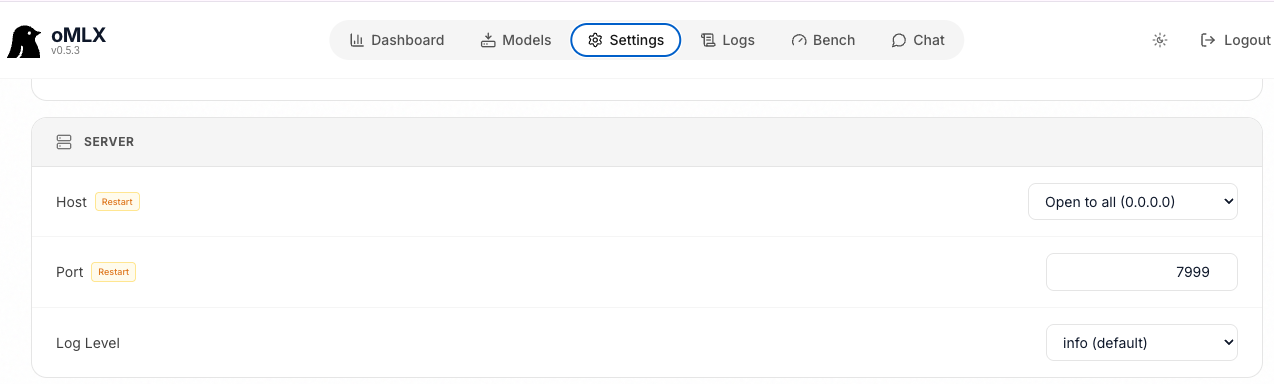
- Restart the server:
omlx stopthenomlx start - Download a model: from
hugging facemlx model named:Ornith-1.0-9B-6bit
| Models Tested | Comments |
|---|---|
| Ornith-1.0-9B-6bit | Run in 32GB RAMN. M3. Model in Hugging Face |
| Qwen3.6-27B-PARO | INT4 quantization close to FP16 in accuracy. Good at reasoning and coding. |
Set environment variables
Edit the repo-root .env (or set DOTENV_FILE to an external file):
| Variable | Purpose |
|---|---|
SL_LLM_BASE_URL | OpenAI-compatible API base (default is local http://localhost:7999/v1) |
SL_LLM_MODEL | Model id from response of curl GET $SL_LLM_BASE_URL/models |
SL_LLM_API_KEY | API key if required by your server |
Setup fails if the LLM server is not reachable or the configured model is missing or has a context window below 8000 tokens. Start your local inference server before running setup.
Optional: Flink deploy credentials
Translate-only runs use --skip-deploy and do not need Confluent Cloud credentials. For deploy, fill FLINK_* variables in .env.
Fill LLM and Flink credentials in .env
Verified CLIs
| CLI | Harness directory |
|---|---|
flink-skill-mcp, flink-skill-validate | flink-skill-common/harness |
ksql-flink-migrate | ksql-to-flink-skill/harness |
spark-flink-migrate | spark-to-flink-skill/harness |
Developer: see the pyproject.toml under flink-skill-common, ksql-to-flink-skill and spark-to-flink-skill
Skills: Agno vs Cursor/Claude Code
| Runtime | Skill source | Validation | Deploy fix on failure |
|---|---|---|---|
| Agno harness / CLI | skill/SKILL.md (canonical) | flink-skill-validate CLI or skill/scripts/validate_offline.py | Agno FlinkSqlDeployFixerAgent when AGENT_FIXER_EXECUTION_ENABLED=1 |
| Cursor | .cursor/skills/ (generated) | MCP validate_flink_sql_offline on flink-skill-common server | Host assistant + validate-flink-sql fix loop via MCP |
| Claude Code | .claude/skills (generated) | CLI tools in skill | Host assistant + validate-flink-sql fix loop; MCP deploy when configured |
As a developer or for tuning the skill, edit the canonical skill/SKILL.md, then refresh the IDE skills: