Quick Start for the demonstration
For this demonstration developers see the specific instructions to run all components locally. For persons willing to just run the demonstration from docker and Confluent Cloud follow the following instructions:
Prerequisites
- Get docker cli and docker compose, with access to public docker hub. The docker images are public:
- [Optional] get terraform cli (if you want to define Confluent Cloud infrastructure like the Kafka Cluster, Flink Compute pool, service account, APIs)
- [Optional] get shift_left utilities if you want to use a custom CLI to manage Flink project at scale.
Gather API Keys
- Get Organization ID, CONFLUENT_CLOUD_API_KEY, CONFLUENT_CLOUD_API_SECRET, Cloud provider, and region.
-
The backend uses one file for environment variables: the
./backend/.env.Modify the top section of the file if you will create the environment, kafka cluster, schema registry and Flink Compute pool with Terraform.
Infrastructure as Code
If you do not have a Confluent Cloud Environment, a Kafka cluster, a schema registry and Flink compute pools, you can use the Terraform in the IaC folder.
You can also reuse existing resources. See detail explanations in IaC readme
-
New infrastructure deployment with Terraform:
cd IaC
# Configure
cp terraform.tfvars.example terraform.tfvars
# Modify
vi terraform.tfvars
terraform init
terraform plan
terraform apply --auto-approve
The outputs should look like:
app_flink_api_key_id = <sensitive> app_flink_api_key_secret = <sensitive> app_kafka_api_key_id = <sensitive> app_kafka_api_key_secret = <sensitive> app_schema_registry_api_key_id = <sensitive> app_schema_registry_api_key_secret = <sensitive> app_service_account_id = "sa-v7gw6p0" backend_env = <sensitive> backend_env_snippet = <sensitive> cloud_provider = "AWS" cloud_region = "us-west-2" env_display_name = "health-env" env_id = "env-ywqmyk" flink_compute_pool_id = "lfcp-wvkx7m" flink_compute_pool_resource_name = "crn://confluent.cloud/organization=49cee212-6346-438a-a1fa-d1b1cbd90d44/environment=env-ywqmyk/flink-region=aws.us-west-2/compute-pool=lfcp-wvkx7m" flink_rest_endpoint = "https://flink.us-west-2.aws.confluent.cloud" kafka_bootstrap_endpoint = "SASL_SSL://pkc-n98pk.us-west-2.aws.confluent.cloud:9092" kafka_cluster_display_name = "health-kafka" kafka_cluster_id = "lkc-kpwy8m" kafka_rest_endpoint = "https://pkc-n98pk.us-west-2.aws.confluent.cloud:443" schema_registry_endpoint = "https://psrc-1ryeo07.us-west-2.aws.confluent.cloud" schema_registry_id = "lsrc-50yv72" schema_registry_rest_endpoint = "https://psrc-1ryeo07.us-west-2.aws.confluent.cloud" -
Run this command to get environment variables (to see them)
The response is a json document will all the envronment variables
{"FLINK_API_KEY":"....", "FLINK_API_SECRET":"cflt.....", "FLINK_COMPUTE_POOL_ID":"lfcp-....", "FLINK_REST_ENDPOINT":"https://flink......confluent.cloud", "KAFKA_API_KEY":"....", "KAFKA_API_SECRET":"cflt.....", "KAFKA_BOOTSTRAP_SERVERS":"SASL_SSL://pkc-......confluent.cloud:9092", "KAFKA_CLUSTER_ID":"lkc-...", "KAFKA_REST_ENDPOINT":"https://pkc-....confluent.cloud:443", "KAFKA_SASL_PASSWORD":"cfltVO...A", "KAFKA_SASL_USERNAME":"....", "PRINCIPAL_ID":"sa-...","SCHEMA_REGISTRY_BASIC_AUTH_USER_INFO":"....", "SCHEMA_REGISTRY_URL":"https://psrc-....confluent.cloud"} -
modify the
backend/.envwith the created API KEYs and SECRETs using a dedicated scriptThe backend/.env should get the new environment variables settings.
Reuse existing Confluent Cloud Resources
In case you want to reuse an existing Confluent environment, Kafka cluster, schema registry and keys and secrets, set them in the terraform.tfvars file.
# ------------------------------------------
# Optional: use existing Confluent infrastructure
# ------------------------------------------
# environment_id   = "env-r69ry1"
# kafka_cluster_id = "lkc-jxqypp"
# service_account_id = "sa-gqvnrzm"
# flink_compute_pool_id = "lfcp-916r8m"

# Existing API keys (optional; otherwise Terraform creates demo keys in app_credentials.tf)
# kafka_api_key_id     = "..."
# kafka_api_key_secret = "..."
# schema_registry_api_key_id     = "..."
# schema_registry_api_key_secret = "..."
# flink_api_key_id     = "..."
# flink_api_key_secret = "..."
Create CDC Topic
-
Login to confluent using cli:
-
Run shell to create precription topic
Update environment variables in current shell
If you plan to use shift_left utils add the following step:
Local Execution Of the Demo Components
Access to the demonstration web application
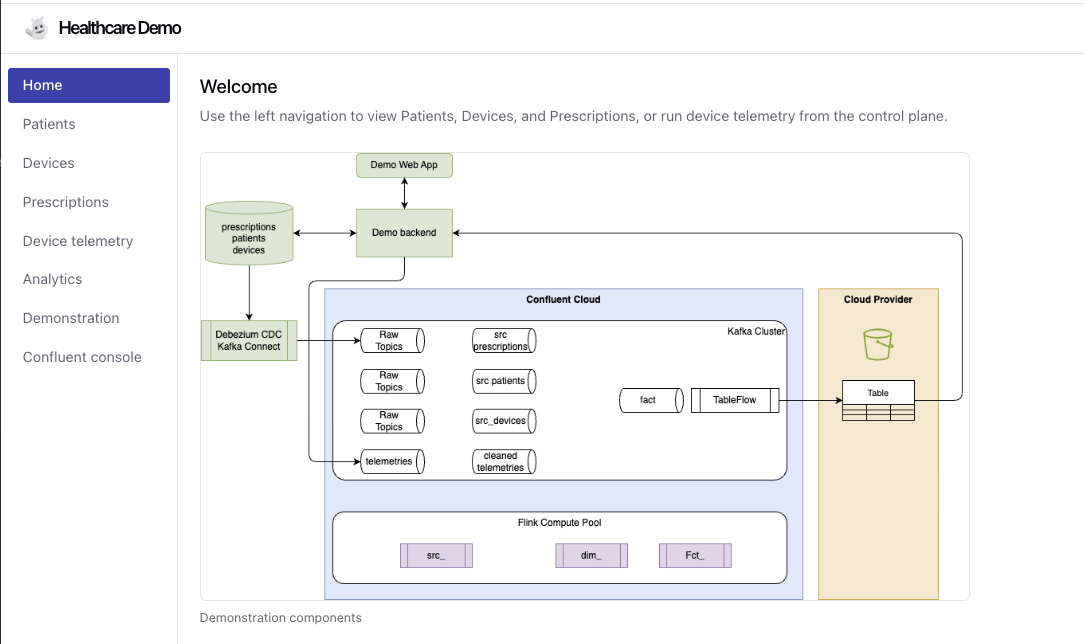
You can drive the demonstration from the user interface or via curl calls:
# Start simulation
sleep 10
curl -X POST http://localhost:8000/simulation/start \
  -H "Content-Type: application/json" \
  -d '{"simulation_type": "all"}'
Start Device Simulation
The simulation sends telemetry data to Kafka:
# Start simulation for all devices
curl -X POST http://localhost:8000/simulation/start \
  -H "Content-Type: application/json" \
  -d '{"simulation_type": "all"}'

# Check simulation status
curl http://localhost:8000/simulation/status

# Stop simulation
curl -X POST http://localhost:8000/simulation/stop
Verify
# Check status
curl http://localhost:8000/health
curl http://localhost:8000/simulation/status

# Open browser
open http://localhost:5173
open http://localhost:5173/analytics
URLs
| Service | URL |
|---|---|
| Frontend | http://localhost:5173 |
| Backend API | http://localhost:8000/docs |
| Analytics | http://localhost:5173/analytics |
| Telemetry | http://localhost:5173/telemetry |
Deploy Flink Pipelines
There are multiple ways to deploy flink statement:
- Terraform not recommended for production
- Shift_left utils for bigger project using medaillon architecture, and best practices
- [Dbt Confluent Adapter]
- Confluent Cloud REST api with some custom python code
Using Shift Left CLI
- Prepare the metadata:
-
Change some setting for current source topics
-
Assess one of the leaf table execution path:
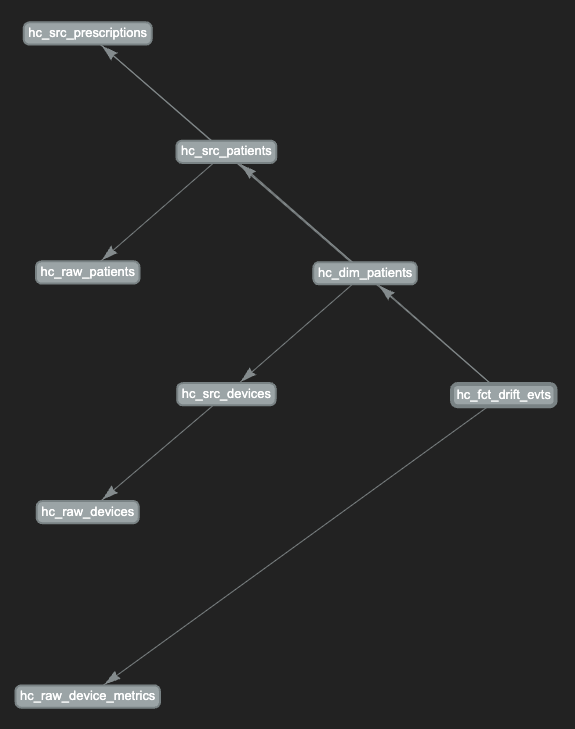
-
Deploy a full pipeline
-
Undeploy: the best approach is to deploy per data products:
Using Terraform
Using confluent RESP API
cd pipelines/flink_pipelines
python3 deploy_flink.py --all

# Deploy specific layer
python3 deploy_flink.py --layer raw
Troubleshouting
Quick Diagnostics
# Check all services
docker compose ps

# Check environment
env | grep -E "KAFKA|FLINK|SCHEMA"

# Test API
curl http://localhost:8000/health
curl http://localhost:8000/analytics/dashboard | jq '.available'

# Check data
curl http://localhost:8000/telemetry/metrics | jq '. | length'
Backend
# Restart backend
docker compose restart backend

# View logs
docker compose logs -f backend

# Stop simulation
curl -X POST http://localhost:8000/simulation/stop
"Terraform apply fails"
"Docker won't start"
"No data in dashboard"
# Restart simulation
curl -X POST http://localhost:8000/simulation/stop
curl -X POST http://localhost:8000/simulation/start

# Check logs
docker compose logs backend