Introduction
Goals
The scope of this repository is to build an end-to-end healthcare related demonstration, starting from Debezium CDC to Confluent Cloud Kafka, Flink SQL to process Raw->Bronze->Silver->Gold records, to sink s3 parquet/iceberg tables.
The approach is to use healthcare use case, like Patient records, health provider, prescriptions and device monitoring. The demonstration illustrates device monitoring and compliance to a doctor's prescription. With the basic domain model but representing good foundations to present different real-time processing use cases. We use Flink to compare Command/Intent (The Prescription) against Reality (The Telemetry).
The audiance of this demonstration is data engineers to understand the art of feaseable.
Table of Content
Architecture
Pipelines Architecture
The figure below presents the production deployment of data streaming pipelines from processing raw data to silver or gold records. The pipeline processing is done using Confluent Cloud Flink SQL queries.
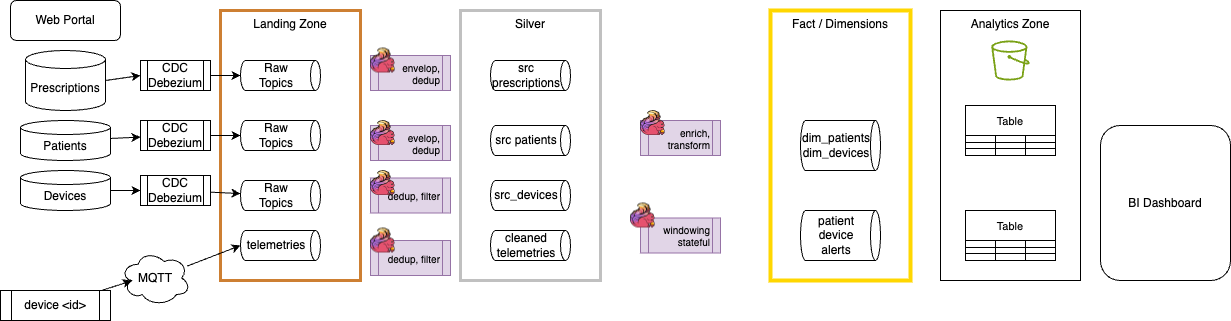
In this demonstration only Prescription entities are using CDC. The landign zone represents the raw data, while a first layer of Flink processing helps to prepare silver data, with deduplication, schema transformation and filtering.
This diagram also presents a second layer of Flink statements to prepare facts and dimensions as data as a product.
Demonstration Components
Applying this pipeline architecture to a deployment architecture, the Flink and Topics are running in Confluent Cloud. Sink tables used for Lake house platform are saved in parquet format, with Apache Iceberg metadata, in a Cloud Provider object storage layer.
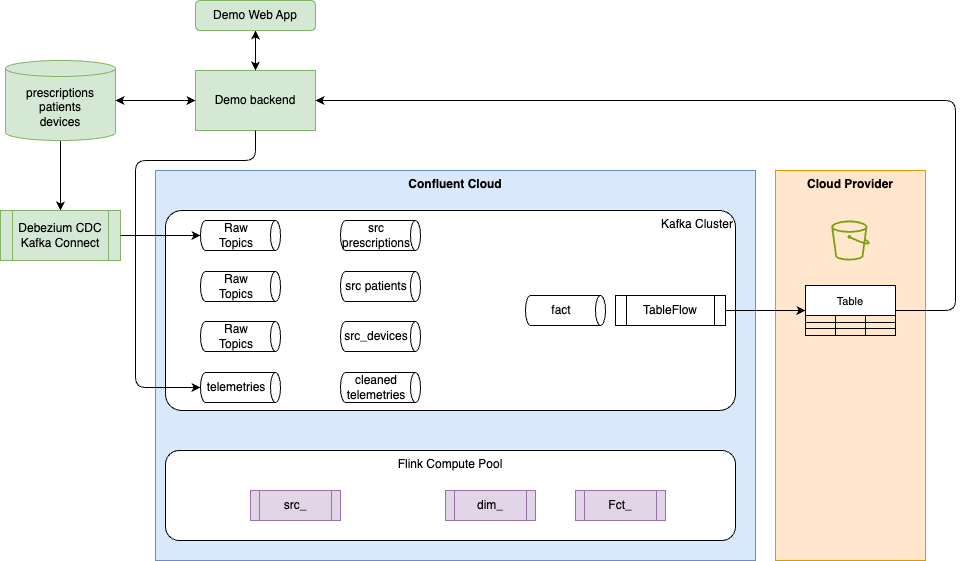
The green components are for demonstration purpose and will run on your laptop.
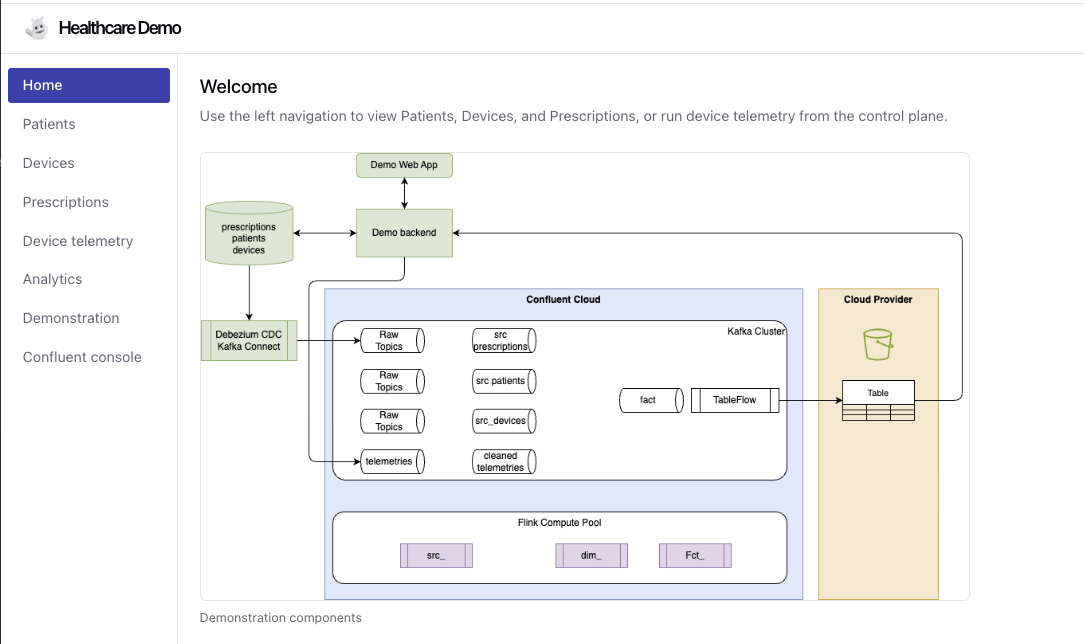
Here is an example of the WebApp home pag, with e sidebar to navigate into the demonstration steps:
Demonstration Features
- Backend (FastAPI) — REST API for patients, devices, and prescriptions; health check; device simulation (start/stop, all or single patient); device telemetry streamed via Server-Sent Events (SSE) and produced to Confluent Cloud Kafka (Avro + Schema Registry).
- PostgreSQL — Prescriptions stored in Postgres with logical decoding enabled (
wal_level=logical) for CDC. One row per prescription; parameters stored as JSON. - Prescriptions CRUD — Create, read, update, and delete prescriptions via API and frontend. Prescription IDs are generated with a 4-character suffix (e.g.
RX-DEV-P002-a3F9) to avoid duplicates. Requires PostgreSQL (DATABASE_URL). - Frontend (Vue.js) — Control plane with navigation: Home, Patients, Devices, Prescriptions, Device telemetry, Demonstration. List views for patients, devices, and prescriptions (grouped by device); “New prescription” form with patient/device dropdowns and parameter rows; delete prescription per row; simulation control; live telemetry SSE stream.
- Kafka Connect + Debezium — Connect runs in Docker Compose; Debezium PostgreSQL connector streams changes from the local
prescriptionstable to Confluent Cloud Kafka (Avro, Schema Registry). Topic prefixhealthcare(e.g.healthcare.public.prescriptions). Register connector with./connect/register-connector.sh. The implementation adds a schema name stratefy to support different Schema Registry context. - Pipelines — Flink SQL DDL/DML for raw and RMD layers (e.g. raw_patients, raw_devices, raw_prescriptions, device_metrics). Deploy with shift-left tool to Confluent Cloud Flink.
Use Cases
Building golden records
As part of moving from batch to real-time processing the following dimensions and facts can be created. Dimensions are static/slow-moving context (who/what/where), facts are events with timestamps and additive measures.
| Dim/Fact | Explanation | Reference |
|---|---|---|
| dim_patients | one row per patient (with device and current prescription-derived settings: pressure, flow rate, flow level | dml.dim_patients.sql |
| fact_drift_events | Assess devise metric vs prescription, one row per drift alert | dml.hc_fct_drift_evts.sql |
| Telemetry Facts | fact_telemetry_1h: windowed aggregates per device/patient/metric. fact_compliance_1h: in-range vs total readings (and optionally compliance_pct) per window. | dml.hc_fct_telemetry_1h.sql |
| Anomaly Detection | Fact table to compute anomaly on Pressure, FlowRate or FlowLevel | hc_fct_dev_anomaly.sql |
To support the demonstration of how those facts are created, see these explanations.

Compliance Alerting
Use a join between the Prescription stream with the DeviceTelemetry stream to check for Prescription Drift. The prescriptions change rarely. If DeviceTelemetry.metricValue is outside the Prescription.targetValue ± toleranceRange for more than \(X\) minutes, trigger an alert. The Sink: Send the alert to a new Kafka topic: alerts.compliance.non-adherence.
Device's health
With the Device telemetry page we can simulate Pressure, flowRate or flowlevel defect. Starting the simulation sends messages to the hc_raw_device_metrics topic, for all the 5 devices in the demonstration.
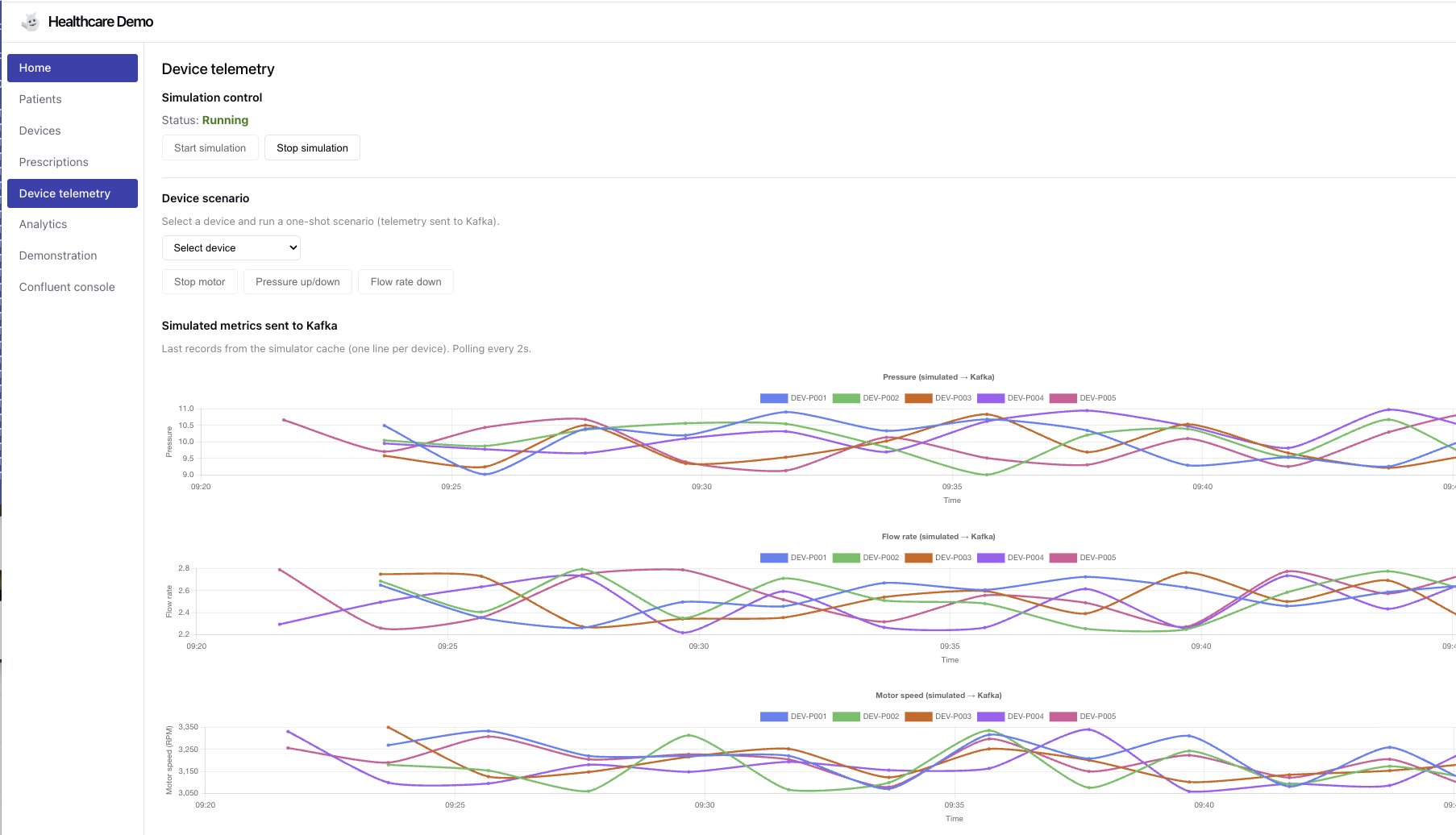
Once the simulation is running, the user can select one of the device and apply one of the 3 simulation.
An anomaly detection query can assess the three metrics and report potential issue.
Other extensions
Goal assess device reliability:
- Windowed Aggregation: Calculate the average Pressure level or rate flow over a 1-hour tumbling window.
- Pattern Recognition: If the Pressure increases by $>10% over three consecutive windows while FlowRate remains constant, the device may have a clogged filter.
If we do an insulin pump, we can have Flink detecting a spike in BloodGlucose (Telemetry). Then checks the Prescription for the maximum allowable dose, to finally sends a command back to a Kafka topic device.commands to trigger an insulin bolus automatically.