Flink SQL DML
Updates
Created 10/24, Updated 12/20/24 Revised 12/06/24
This chapter offers continue on the best practices for implementing Flink SQL solutions, for Data Manipulation Language queries. DML is used to define statements which modify the data and don’t change the metadata.
Sources Of Information
- Confluent SQL documentation for DML samples
- Apache Flink SQL
- Confluent Developer Flink tutorials
- The Flink built-in system functions.
Common Patterns
This is important to recall that a select applies to a stream of record so the results will change at each new record. A query as below will show the last top 10 orders, and when a new record arrives this list is updated.
What are the different SQL execution modes? (OSS)
Using previous table it is possible to count the elements in the table using:
and we get different behaviors depending of the execution mode:
set 'execution.runtime-mode' = 'batch';
# default one
set 'execution.runtime-mode' = 'streaming';

set 'sql-client.execution.result-mode' = 'table';
In changelog mode, the SQL Client doesn't just update the count in place, but instead displays each message in the stream of updates it's receiving from the Flink SQL runtime.

See this lab in changelog mode and this section in SQL concepts chapter.
Filtering
- Start by looking at this Confluent tutorial or The Apache Flink doc section
- SELECT ... FROM ... WHERE ... consists of column projections or filters and are stateless. Except if the output table has a a
retractchangelog while input isupsert, the sink will have achangelog materializer(see section below.) - SELECT DISTINCT to remove duplicate rows. Which leads to keep state for each row.
How to filter out records?
using the WHERE clause
Count the number of events related to a cancelled flight (need to use one of the selected field as grouping key):
select fight_id, count(*) as cancelled_fl from FlightEvents where status = 'cancelled' group by flight_id;
Recall that this results produces a dynamic table.
HAVING to filter after aggregation
The HAVING clause is used to filter results after the aggregation (i.e., like GROUP BY). It is similar to the WHERE clause, but while WHERE filters rows before aggregation, HAVING filters rows after aggregation.
How to combine records from multiple tables (UNION)?
When the two tables has the same number of columns of the same type, then we can combine them:
See product documentation on Union. Remember that UNION will apply distinct, and avoid duplicate, while UNION ALL will generate duplicates.
How to filter row that has column content not matching a regular expression?
Use REGEX
Navigate a hierarchical structure in a table
The unique table has node and ancestors representation. Suppose the graph represents a Procedure at the highest level, then an Operation, then a Phase and a Phase Step at the level 4. In the Procedures table we can have rows like:
id, parent_ids, depth, information
'id_1', [], 0 , 'procedure 1'
'id_2', ['id_1'], 1 , 'operation 1'
'id_3', ['id_1','id_2'], 2 , 'phase 1'
'id_4', ['id_1','id_2','id_3'], 3 , 'phase_step 1'
'id_5', ['id_1','id_2','id_3'], 3 , 'phase_step 2'
Suppose we want to extract the matching procedure_id, operation_id, phase_id, phase_step_id like
id, procedure_id, operation_id, phase_id, phase_step_id, information
'id_1', 'id_1', NULL, NULL, NULL, 'procedure 1'
'id_2', 'id_1', 'id_2', NULL, NULL, 'operation 1'
'id_3', 'id_1', 'id_2', 'id_3', NULL, 'phase 1'
'id_4', 'id_1', 'id_2', 'id_3', 'id_4', 'phase_step 1'
'id_5', 'id_1', 'id_2', 'id_3', 'id_5', 'phase_step 2'
if the depth is 3, then the response should have all ids populated, if 0 only the top level is returned.
with `procedures` as (
    select 'id_1' as id, array[''] as parentIds, 0 as `depth` , 'procedure 1' as info
    UNION ALL
    select 'id_2' as id, array['id_1'] as parentIds, 1 as `depth` , 'operation 1' as info
    UNION ALL
    select 'id_3' as id, array['id_1','id_2'] as parentIds, 2 as `depth`, 'phase 1' as info
    UNION ALL
    select 'id_4' as id, array['id_1','id_2','id_3'] as parentIds, 3 as `depth`, 'phase_step 1' as info
    UNION ALL
    select 'id_5' as id, array['id_1','id_2','id_3'] as parentIds, 3 as `depth`, 'phase_step 2' as info
    )
select
    id,
    parent_id,
    case when `depth` = 3 then id end as phase_step_id,
    case when `depth` = 2 then id end as phase_id,
    case when `depth` = 1 then id end as operation_id,
    case when `depth` = 0 then id end as procedure_id,
    info from `procedures` cross join unnest(parentIds) as ids(parent_id)
Deduplication
Deduplication will occur on upsert table with primary key: the last records per $rowtime or other timestamp will be kept. When the source table is in append mode, the approach is to use the ROW_NUMBER() combined with OVER():
CREATE TABLE unique_clicks
AS SELECT ip_address, url, TO_TIMESTAMP(FROM_UNIXTIME(click_ts_raw)) as click_timestamp
    FROM (
        SELECT *,
        ROW_NUMBER() OVER ( PARTITION BY ip_address ORDER BY TO_TIMESTAMP(FROM_UNIXTIME(click_ts_raw)) ASC) as rownum
        FROM clicks
        )
    WHERE rownum = 1;
- The query is designed to identify and persist only the earliest record. Once the record is written to the table_deduped any subsequent events pertaining to the same
ip_addressare effectively discarded by theWHERE rownum = 1filter. - ROW_NUMBER() Assigns an unique, sequential number to each row. It is part of the Top-N queries pattern.
- Use OVER aggregation to compute agg value for every input window clause and a filter condition to express a Top-N query. Combined with PARTITION BY clause, Flink supports a per group Top-N.
- The internal CTE add a row_num for each
- The subsequent
WHERE rownum = 1clause filters the results to retain only the very first event observed for each uniqueip_addressbased on its timestamp. - The created table is an append table. There is no mechanism within this query to generate update or delete operations for records that have already been processed. Even if the underlying
clickstable has a primary key defined, the transformation applied here dictates that theunique_clickstable will only ever grow by appending new, uniqueip_addressentries. - If the sorting was DESC when a new record arrive a retraction/update record is emitted.
- If after deduplication, the upsert sink needs to have the same key as the partition keys used.
See this example in the Confluent product documentation which demonstrates there is no duplicate in the query result with select * from dedup_table; returns 8 messages. Same in the Kafka topic there are 8 messages .
But it does not demonstrate the last message is kept. The deduplication sample demonstrates that an upsert table is already removing duplicates, and keep the last record per key.
- Confluent Cloud has limitations: the order by can only be timestamp in ASC mode.
- Example of deduplication on OSS Flink where order can apply to any column type.
Transformation
Some important resources:
- Transform a Topic with Confluent Cloud for Apache Flink - product doc to demonstrate topic transformation from the Data Portal -> Actions -> Transform Topic, which creates a CTAS Flink SQL statment and automatically deploys it to the configured computepool. This is very efficient to do avro to json, field rename, and primary key reallocation.
How to transform a field representing epoch to a timestamp?
epoch is a BIGINT.
How to change a date string to a timestamp?
See all the date and time functions.
How to compare a date field with current system time?
If the target table is set with a changelog mode = upsert, the use of the now() function is problematic because the exact execution time is not deterministic for each row. So the above statement works only for append mode.
How to extract the number of DAY, from a date field and now?
The only diff is on timestamp. So need to first to cast the DATE column to a ts, and then use CURRENT_DATE and the DAY dimension. See the supported dimensions (SECOND, MINUTE, HOUR, DAY, MONTH, or YEAR)
How to access element of an array of rows?
The table has a column that is an array of rows.
To create one record per row within the array, so exploding the array, use CROSS JOIN UNNEST:
 SELECT
    t.key_col,
    unnested_row.id,
    unnested_row.name
FROM
    my_table AS t
CROSS JOIN UNNEST(t.nested_data) AS unnested_row;
Each row in the nested_data array will be a row in the output table with the matching key_col.
How to use conditional functions?
Flink has built-in conditional functions (See also Confluent support) and specially the CASE WHEN:
How to mask a field?
Create a new table from the existing one, and then use REGEXP_REPLACE to mask an existing attribute
JSON Transformation
Flink has a set of JSON built in functions. '$'' denotes the root node in a JSON path.
Paths can access properties (\(.a), array elements (\).a[0].b), or branch over all elements in an array ($.a[*].b).
How to access json data from a string column being a json object?
Use json_query function in the select.
Use json_value() instead if the column content is a dict or json {}.
How to transform a json array column (named data) into an array to then generate n rows?
Returning an array from a json string:
To create as many rows as there are elements in the nested array:
SELECT existing_column, anewcolumn from table_name
cross join unnest (json_query(`data`, '$' RETURNING ARRAY<STRING>)) as t(anewcolumn)
UNNEST returns a new row for each element in the array See multiset expansion doc
Extract content from json array as string and explode to multiple rows?
The input record has a parameters column with an array of objects, with key-value pair, like:
[{"parameter_name": "Pressure", "parameter_value": 10.0, "parameter_type": "float", "parameter_tolerance": 1.0}, {"parameter_name": "FlowRate", "parameter_value": 2.5, "parameter_type": "float", "parameter_tolerance": 0.5}, {"parameter_name": "MotorSpeed", "parameter_value": 3200.0, "parameter_type": "float", "parameter_tolerance": 150.0}]
SELECT
    prescription_id,
    patient_id,
    device_id,
    medication_or_therapy,
    JSON_VALUE(param_obj, 'lax $.parameter_name')     AS metric_name,
    CAST(JSON_VALUE(param_obj, 'lax $.parameter_value' RETURNING DOUBLE) AS DOUBLE) AS target_value,
    CAST(JSON_VALUE(param_obj, 'lax $.parameter_tolerance' RETURNING DOUBLE) AS DOUBLE) AS tolerance_range,
    start_date,
    end_date
FROM `healthcare.public.prescriptions`
CROSS JOIN UNNEST(
    JSON_QUERY(parameters, 'lax $[*]' RETURNING ARRAY<STRING>)
    ) AS t(param_obj)
WHERE parameters IS NOT NULL AND TRIM(parameters) <> '' AND TRIM(parameters) <> '[]';
How to implement the equivalent of SQL explode?
In classical SQL, EXPLODE creates a row for each element in the array or map, and ignore null or empty values in array.
SQL has also EXPLODE_OUTER, which returns all values in array including null or empty.
To translate this to Flink SQL we can use MAP_ENTRIES and MAP_FROM_ARRAYS. MAP_ENTRIES returns an array of all entries in the given map. While MAP_FROM_ARRAYS returns a map created from an arrays of keys and values.
As presented in previous question, CROSS JOIN UNNEST(array) is also the recommended solution.
Statement Set
The benefit of bundling statements in a single set is to reduce the repeated read from the source for each Insert. A single read from the source is executed and shared with all downstream INSERTS.
Do not use Statement Set when the source are different for all statements within the Statement Sets. Take into account that within the statement set if one statement fails, then all queries fail. The state is shared by all the statements within Statement set, so one stateful query can impact all other statements.
How to manage late message to be sent to a DLQ using Statement Set?
First, create a DLQ table like late_orders based on the order table:
Groups the main stream processing and the late arrival processing in a statement set:
EXECUTE STATEMENT SET
BEGIN
    INSERT INTO late_orders SELECT from orders WHERE `$rowtime` < CURRENT_WATERMARK(`$rowtime`);
    INSERT INTO order_counts -- the sink table
        SELECT window_time, COUNT(*) as cnt
        FROM TABLE(TUMBLE(TABLE orders DESCRIPTOR(`$rowtime`), INTERVAL '1' MINUTE))
        GROUP BY window_start, window_end, window_time
END
Stateful aggregations
An aggregate function computes a single result from multiple input rows.
Group BY
Classical SQL grouping of records, but with Streaming the state may grow infinitely. The size will depend of the # of groups and the amount of data to keep per group. group by generates upsert events as it manages key-value and repartitions data.
EXPLAIN
SELECT
  account_number,
  transaction_type,
  SUM(amount)
  FROM `transactions`
  where transaction_type = 'withdrawal'
  GROUP BY account_number,  transaction_type
HAVING SUM(amount) > 5000
The physical plan looks like
== Physical Plan ==

StreamSink [6]
  +- StreamCalc [5]
    +- StreamGroupAggregate [4]
      +- StreamExchange [3]
        +- StreamCalc [2]
          +- StreamTableSourceScan [1]

== Physical Details ==

[1] StreamTableSourceScan
Table: `j9r-env`.`j9r-kafka`.`transactions`
Primary key: (txn_id)
Changelog mode: append
Upsert key: (txn_id)
State size: low
Startup mode: earliest-offset
Key format: avro-registry
Key registry schemas: (:.:transactions/100220)
Value format: avro-registry
Value registry schemas: (:.:transactions/100219)

[4] StreamGroupAggregate
Changelog mode: retract
Upsert key: (account_number,transaction_type)
State size: medium
State TTL: never

[5] StreamCalc
Changelog mode: retract
Upsert key: (account_number,transaction_type)

[6] StreamSink
Table: Foreground
Changelog mode: retract
Upsert key: (account_number,transaction_type)
State size: low
Distinct
Remove duplicate before doing the aggregation:
ARRAY_AGG
Array aggregation refers to the process of combining multiple data elements into a single array structure. The goal is to regroup multiple data points together. Array aggregation plays a pivotal role in data processing due to its ability to manage and analyze vast amounts of information effectively
This Flink ARRAY_AGG, aggregate function is a common function used in a lot of record transformation implementations. The function returns an array with elements coming from multiple rows from the input table.
Let start by a simple array indexing (the index is between 1 to n_element). Below, the values array creates test data into a memory table aliased a T with a column named array_field:
The following SQL, is creating a view with an array of aggregates, which in this case, is concatenating the urls for each user_id over a 1 minute tumble window.
CREATE VIEW visited_pages_per_minute AS
SELECT
    window_time,
    user_id,
    ARRAY_AGG(url) AS urls
FROM TABLE(TUMBLE(TABLE `examples.marketplace.clicks`, DESCRIPTOR(`$rowtime`), INTERVAL '1' MINUTE))
GROUP BY window_start, window_end, window_time, user_id;
-- once the view is created
SELECT * from visited_pages_per_minute;

-- it is possible to expand an array into multiple rows using cross join unnest

SELECT v.window_time, v.user_id, u.url FROM visited_pages_per_minute AS v
CROSS JOIN UNNEST(v.urls) AS u(url)
One thing important is that new clicks for the same user_id with new url, will create a new output record with the aggregated array. See cc-array-agg study.
To optimize the processing it is recommended to deduplicate and/or filter records before computing the aggregation, and using Flink View is a good example:
create view suites_versioned as
select  suite_id, suite_name, asset_id, asset_name, asset_price_min, asset_price_max, ts_ltz
from (
    select *,
       ROW_NUMBER() OVER (PARTITION BY suite_id, asset_id ORDER BY ts_ltz DESC) as rn
        from suites
    ) where rn = 1;
Then the array aggregation:
select
    suite_id,
    ARRAY_AGG(ROW (asset_id, asset_name,  ROW(asset_price_min, asset_price_max))) as asset_data,
    max(ts_ltz) as ts_ltz
from suites_versioned group by suite_id;
As seen in example above the type within the array can be a row and sub-row. See SQL examples
OVER
OVER aggregations computes an aggregated value for every input row over a range of ordered rows. It does not reduce the number of resulting rows, as GROUP BY does, but produces one result for every input row.
OVER specifies the time window over which the aggregation is performed. A classical example is to get a moving sum or average: the number of orders in the last 10 seconds:
SELECT
    order_id,
    customer_id,
    `$rowtime`,
    SUM(price) OVER w AS total_price_ten_secs,
    COUNT(*) OVER w AS total_orders_ten_secs
FROM `examples`.`marketplace`.`orders`
WINDOW w AS (
    PARTITION BY customer_id
    ORDER BY `$rowtime`
    RANGE BETWEEN INTERVAL '10' SECONDS PRECEDING AND CURRENT ROW
)
The source topic needs to be append mode as over window operaton does not supporting retraction/update semantic.
The changelog mode, of the output of OVER is append. This is helpful when we need to act on each input row, but consider some time interval.
To get the order exceeding some limits for the first time and then when the computed aggregates go below other limits. LAG
-- compute the total price and # of orders for a period of 10s for each customer
WITH orders_ten_secs AS (
SELECT
    order_id,
    customer_id,
    `$rowtime`,
    SUM(price) OVER w AS total_price_ten_secs,
    COUNT(*) OVER w AS total_orders_ten_secs
FROM `examples`.`marketplace`.`orders`
WINDOW w AS (
    PARTITION BY customer_id
    ORDER BY `$rowtime`
    RANGE BETWEEN INTERVAL '10' SECONDS PRECEDING AND CURRENT ROW
    )
),
-- get previous orders and current order per customer
orders_ten_secs_with_lag AS (
SELECT
    *,
    LAG(total_price_ten_secs, 1) OVER w AS total_price_ten_secs_lag,
    LAG(total_orders_ten_secs, 1) OVER w AS total_orders_ten_secs_lag
FROM orders_ten_secs
WINDOW w AS (
    PARTITION BY customer_id
    ORDER BY `$rowtime`
    )
-- Filter orders when the order price and number of orders were above some limits for previous or current order aggregates
)
SELECT customer_id, 'BLOCK' AS action, `$rowtime` AS updated_at
FROM orders_ten_secs_with_lag
WHERE
    (total_price_ten_secs > 300 AND total_price_ten_secs_lag <= 300) OR
    (total_orders_ten_secs > 5 AND total_orders_ten_secs_lag <= 5)
UNION ALL
SELECT customer_id, 'UNBLOCK' AS action, `$rowtime` AS updated_at
FROM orders_ten_secs_with_lag
WHERE
    (total_price_ten_secs <= 300 AND total_price_ten_secs_lag > 300) OR
    (total_orders_ten_secs <= 5 AND total_orders_ten_secs_lag > 5);
When and how to use custom watermark?
Developer should use their own watermark strategy when there are not a lot of records per topic/partition, there is a need for a large watermark delay, and need to use another timestamp. The default watermark strategy in SOUCE_WATERMARK(), a watermark defined by the source. The common strategy used is the maximim-out-of-orderness to allow messages arriving later to be part of the window, to ensure more accurate results, as a tradeoff of latency. It can be defined using:
The minimum out-of-orderness is 50ms and can be set up to 7 days. See Confluent documentation.
Joins
When doing a join in a database, the result reflects the state of the join at the time we execute the query. In streaming, as both side of a join receive new rows, both side of joins need to continuously change. This is a continuous query on dynamic tables, where the engine needs to keep a lot of state: each row of each table.
This is the common join we do between two tables:
SELECT t.amount, t.order_type, s.name, s.opening_value FROM transactions t
LEFT JOIN stocks s
ON t.stockid = s.id
On the left side, the fact table, has high velocity of changes, but the events are immutables, while on the right side, the dimension, the new records arrive slowly.
When doing a join, Flink needs to fully materialize both the right and left of the join tables in state, which may cost a lot of memory, because if a row in the left-hand table (LHT), also named the probe side, is updated, the operator needs to emit an updated match for all matching rows in the right-hand table (RHT) or build side. The cardinality of right side will be mostly bounded at a given point of time, but the left side may vary a lot. A join emits matching rows to downstream operator.
The key points to keep in mind are:
- Regular joins typically produce a full cross-product of all matching records. However, in streaming scenarios, this behavior is often undesirable, for example if you want to enrich an event with additional information.
- The order of joins is important, try to get the first join done on table with the lowest update frequency.
- Cross join makes the query fails
- When the RHS is an upsert table, the result will be upsert too. Which means a result will be re-emitted if the RHS change. To avoid that we need to take the reference data, RHS, in effect at time of the event on LHS. The result is becoming time-versioned.
Temporal Join
A temporal join joins one table with another table that is updated over time. This join is made possible by linking both tables using a time attribute, which allows the join to consider the historical changes in the table.
```sql
insert into enriched_transactions
SELECT t.amount, t.order_type, s.name, s.opening_value FROM transactions t
LEFT JOIN stocks s FOR SYSTEM_TIME AS OF t.purchase_ts
ON t.stockid = s.id
```
- The above query is a Temporal join. Temporal joins help to reduce the state size, as we need to keep only recent records on both side. The time will be linked to the watermark progress. If the opening_value of the stock change over time, it will not trigger update to the previously generated enriched transactions.
-
Temporal JOINs must include all of the PRIMARY KEY columns of the versioned (right-side) table: the ON conditions need to include exactly the same primary key columns:
sql create table dim_rule_config( tenant_id STRING NOT NULL, rule_id BIGINT NOT NULL, rule_name STRING NOT NULL, parameter_id BIGINT NOT NULL, paremeter_value BIGINT, primary key (tenant_id, rule_id, parameter_id) not enforced ) # joining in a separate DML ... from extended_sensors s left join dim_rule_config for system as of s.event_ts as rule ON s.tenant_id = rule.tenant_id AND s.rule_id = rule.rule_id AND s.parameter_id = rule.parameter_idThe extended_sensors is a CTE to add specific constant columns, as the ON conditions need to apply to columns on on the LHS. So to be able to search for specific rule id and parameter id, the approach is to create a CTE:
with extended_sensors (
    select
    ... all sensors attributes
    10 as rule_id,
    1 as parameter_id
    from sensors
) select ...
See also this code sample for an example of rule based control with temporal joins and contant columns.
-
When the LHS of the temporal join is upsert then the sink table needs to be retract. While if it is an append changelog then the sink should be append too.
- INNER JOIN is a cartesian product.
- OUTER joins like left, right or full, may generate records with empty columns for non-matching row.
Interval Join
-
Interval joins are particularly useful when working with unbounded data streams. Here is an example for orders and payments, where
CREATE TABLE valid_orders ( order_id STRING, customer_id INT, product_id STRING, order_time TIMESTAMP_LTZ(3), payment_time TIMESTAMP_LTZ(3), amount DECIMAL, WATERMARK FOR order_time AS order_time - INTERVAL '5' SECOND ) AS SELECT unique_orders.order_id, customer_id, product_id, unique_orders.`$rowtime` AS order_time, payment_time, amount FROM unique_orders INNER JOIN payments ON unique_orders.order_id = payments.order_id WHERE unique_orders.`$rowtime` BETWEEN payment_time - INTERVAL '10' MINUTES AND payment_time; -
INTERVAL JOIN requires at least one equi-join predicate and a join condition that bounds the time on both sides.
Lateral Joins
LATERAL TABLE clause is used to invoke a Table-Valued Function (TVF) or a User-Defined Table Function (UDTF) for every row of a base (outer) table. The Lateral Join evaluates a subquery or a function for each row of the first table, and the result of that evaluation is then joined back to the original row. The UDTF/TVF on the right side of the join can reference columns from the table on the left side.
SELECT
    t.*,
    tf.*
FROM
    input_table AS t,
    LATERAL TABLE(udtf_function(t.column_a, t.column_b)) AS tf(output_column_1, output_column_2)
We can combine the LATERAL TABLE with different join types to control which rows are preserved
| Joins | Behavior |
|---|---|
| CROSS JOIN LATERAL TABLE(...) | If the UDTF returns zero rows for a given input row, the original row from the outer table is discarded. |
| LEFT JOIN LATERAL | Returns all rows from the outer table, even if the UDTF produces zero rows. |
The Lateral Table allows to dynamically transform stream records in a row-by-row fashion, which is often difficult with standard joins.
Multi way joins
See Confluent Flink SQL documentation for multi-way joins as part of optimizing the flink state. Need to add annotations:
SELECT /*+ MULTI_JOIN(o, c, a) */
* FROM orders o
JOIN customers c ON o.customer_id = c.id
JOIN addresses a ON c.id = a.customer_id;
References
Here is a list of important tutorials on Joins:
- Confluent Cloud: video on joins with details on fow joins work.
- Confluent -developer: How to join streams. The matching content is in flink-sql/04-joins folder for Confluent Cloud or Platform for Flink. This folder also includes more SQL exercises.
- Confluent temporal join documentation.
- Window Join Queries in Confluent Cloud for Apache Flink
- Temporal Join Study in this repo.
FAQs
Inner knowledge on temporal join
Event-time temporal joins are used to join two or more tables based on a common event time (in one of the record table or the kafka record: $rowtime system column). With an event-time attribute, the operator can retrieve the value of a key as it was at some point in the past. The right-side, versioned table, stores all versions, identified by time, since the last watermark.
The temporal Flink sql looks like:
SELECT [column_list]
FROM table1 [AS <alias1>]
[LEFT] JOIN table2 FOR SYSTEM_TIME AS OF table1.{ rowtime } [AS <alias2>]
ON table1.column-name1 = table2.column-name1
When enriching a particular table1, an event-time temporal join waits until the watermark on the table2 stream reaches the timestamp of that table1 row, because only then, it is reasonable to be confident that the result of the join is being produced with complete knowledge of the relevant table2 data. This table2 records can be old as the watermark on that table being late.
How to join two tables on a key within a time window using event column as timestamp and store results in a target table?
Full example:
-- use separate statements to create the tables
create table Transactions (ts TIMESTAMP(3), tid BIGINT, amount INT);
create table Payments (ts TIMESTAMP(3), tid BIGINT, type STRING);
create table Matched (tid BIGINT, amount INT, type STRING);

execute statement set
begin
insert into Transactions values(now(), 10,20),(now(),11,25),(now(),12,34);
insert into Payments values(now(), 10, 'debit'),(now(),11,'debit'),(now(),12,'credit');
insert into Matched
    select T.tid, T.amount, P.type
    from Transactions T join Payments P ON T.tid = P.tid
    where P.ts between T.ts and T.ts + interval '1' minutes;
end
how primary key selection impacts joins?
Primary keys on source tables do not impact joins as the joins can be done on any column of the left and right tables. The important keys are the one on the sink table and they need to match the last join columns.
Understand Left side velocity and update strategy
If the left table has a high velocity and there is no new event for the defined primary key, then it is important to set a TTL on the left side that is short so the state will stay under control. Use the aliases set on the tables and set the retention time.
select /* STATE_TTL('tx'='120s', 'c'='4d') */
    tx_id, account_id, amount, merchant_id, tx_type
from transaction tx
LEFT JOIN account c
on tx.account_id = c.id
Remark: Running an EXPLAIN on the above statement give the TTL.
Join on 1x1 relationship
In current Flink SQL it is not possible to efficiently join elements from two tables when we know the relation is 1 to 1: one transaction to one account, one shipment to one order. As soon as there is a match, normally we want to emit the result and clear the state. This is possible to do so with the DataStream API, not SQL.
Windowing / Table Value Functions
Windowing Table-Valued Functions groups the Tumble, Hop, Cumulate, and Session Windows. Windows split the stream into “buckets” of finite size, over which we can implement logic. The return value adds three additional columns named “window_start”, “window_end”, “window_time” to indicate the assigned window.
- The TUMBLE function assigns each element to a window of specified window size. Tumbling windows have a fixed size and do not overlap.
Count the number of different product type per 10 minutes (TUMBLE window)
Aggregate a Stream in a Tumbling Window documentation.. The following query counts the number of different product types arriving from the event stream by interval of 10 minutes.
SELECT window_start, product_type, count(product_type) as num_ptype
    FROM TABLE(
        TUMBLE(
            TABLE events,
            DESCRIPTOR(`$rowtime`),
            INTERVAL '10' MINUTES
        )
    )
    GROUP BY window_start, window_end, ;
When the internal time has expired the results will be published. This puts an upper bound on how much state Flink needs to keep to handle a query, which in this case is related to the number of different product type.
It is possible to use another timestamp from the input table. For example the transaction_ts TIMESTAMP(3), then we need to declare a watermark on this ts:
WATERMARK FOR transaction_ts AS transaction_ts - INTERVAL '5' SECOND, so it can be used in the descriptor function.
Aggregation over a window
Windows over approach is to end with the current row, and stretches backwards through the history of the stream for a specific interval, either measured in time, or by some number of rows. For example counting the umber of flight_schedule events of the same key over the last 100 events:
select
    flight_id,
    evt_type,
    count(evt_type) OVER w as number_evt,
from flight_events
window w as( partition by flight_id order by $rowtime rows between 100 preceding and current row);
The results are updated for every input row. The partition is by flight_id. Order by $rowtime is necessary.
Find the number of elements in x minutes intervals advanced by 5 minutes? (HOP)
Confluent documentation on window integration.. For HOP wuindow, there is the slide parameter to control how frequently a hopping window is started:
How to compute the accumulate price over time in a day (CUMULATE)
Needs to use the cumulate window, which adds up records to the window until max size, but emits results at each window steps. The is image summarizes well the behavior: 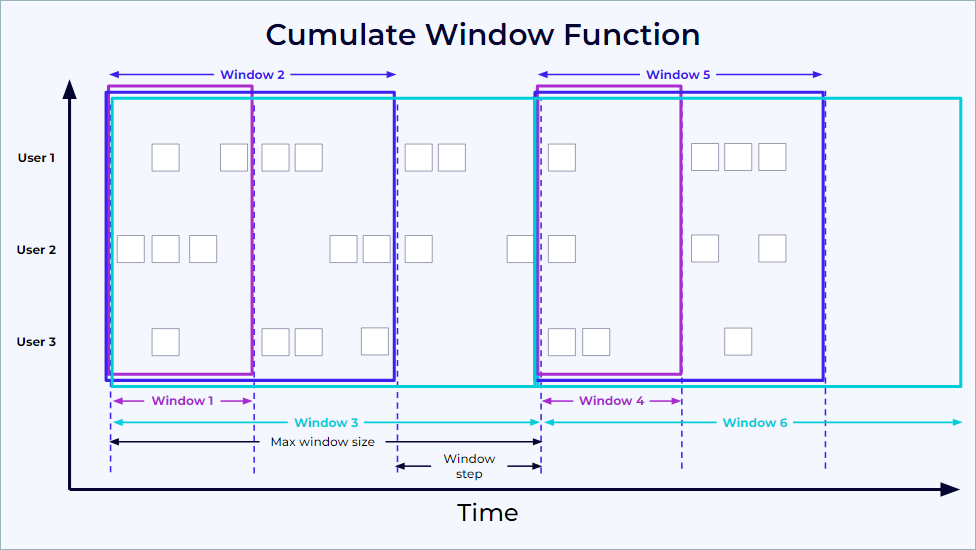
SinkUpsertMaterializer
When operating in upsert mode and processing two update events, a potential issue arises. If input operators for two tables in upsert mode are followed by a join and then a sink operator, update events might arrive at the sink out of order. If the downstream operator's implementation doesn't account for this out-of-order delivery, it can lead to incorrect results.
Flink typically determines the ordering of update history based on the primary key (or upsert keys) through a global analysis in the Flink planner. However, a mismatch can occur between the upsert keys of the join output and the primary key of the sink table. The SinkUpsertMaterializer operator addresses this mapping discrepancy.
This operator maintains a complete list of RowData in its state to correctly process any deletion events originating from the source table. However, this approach can lead to a significant state size, resulting in increased state access I/O overhead and reduced job throughput. Also the output value for each primary key is always the last (tail) element in the maintained list. It is generally advisable to avoid using SinkUpsertMaterializer whenever possible.
Consider a scenario where 1 million records need to be processed across a small set of 1,000 keys. In this case, SinkUpsertMaterializer would need to store a potentially long list, averaging approximately 1,000 records per key.
To mitigate the usage of SinkUpsertMaterializer:
- Ensure that the partition keys used for deduplication, group aggregation, etc., are identical to the sink table's primary keys.
SinkUpsertMaterializeris unnecessary if retractions are generated using the same key as the sink table's primary key. If a large number of records are processed but most are subsequently retracted, SinkUpsertMaterializer can significantly reduce its state size.- Utilize Time-To-Live (TTL) to limit the state size based on time.
- A higher number of distinct values per primary key directly increases the state size of the SinkUpsertMaterializer.
Row pattern recognition
Find the longest period of time for which the average price of a stock did not go below a value
Create a Datagen to publish StockTicker to a Kafka topic. See product documentation on CEP pattern with SQL
create table StockTicker(symbol string, price int tax int) with ('connector' = 'kafka',...)
SELECT * From StockTicker
MATCH_RECOGNIZE (
    partition by symbol
    order by rowtime
    measures
        FIRST(A.rowtime) as start_tstamp,
        LAST(A.rowtime) as last_tstamp,
        AVG(A.price) as avgPrice
    ONE ROW PER MATCH
    AFTER MATCH SKIP PAST LAST ROW
    PATTERN (A+ B)
    DEFINE
        A as AVG(A.price) < 15
);
MATCH_RECOGNIZE helps to logically partition and order the data that is used with the PARTITION BY and ORDER BY clauses, then defines patterns of rows to seek using the PATTERN clause. The logical components of the row pattern variables are specified in the DEFINE clause. B is defined implicitly as not being A.
Confluent Cloud Specifics
See Flink Confluent Cloud queries documentation.
Each topic is automatically mapped to a table with some metadata fields added, like the watermark in the form of $rowtime field, which is mapped to the Kafka record timestamp. To see it, run describe extended table_name; With watermarking. arriving event records will be ingested roughly in order with respect to the $rowtime time attribute field.
Mapping from Kafka record timestamp and table $rowtime
The Kafka record timestamp is automatically mapped to the $rowtime attribute, which is a read only field. Using this field we can order the record by arrival time:
How to run Confluent Cloud for Flink?
See the note, but can be summarized as: 1/ create a stream processing compute pool in the same environment and region as the Kafka cluster, 2/ use Console or CLI (flink shell) to interact with topics.

Running Confluent Cloud Kafka with local Flink
The goal is to demonstrate how to get a cluster created in an existing Confluent Cloud environment and then send message via FlinkFaker using local table to Kafka topic:

The scripts and readme .
Reading from a topic specific offsets
create a long running SQL with cli
Get or create a service account.
Analyzing Statements
Assess the current flink statement running in Confluent Cloud
To assess which jobs are still running, which jobs failed, and which stopped, we can use the user interface, go to the Flink console > . Or the confluent CLI:
Understand the physical execution plan for a SQL query
See the explain keyword or Confluent Flink documentation for the output explanations.
Indentation indicates data flow, with each operator passing results to its parent.
Review the state size, the changelog mode, the upsert key... Operators change changelog modes when different update patterns are needed, such as when moving from streaming reads to aggregations.
Pay special attention to data skew when designing your queries. If a particular key value appears much more frequently than others, it can lead to uneven processing where a single parallel instance becomes overwhelmed handling that key’s data. Consider strategies like adding additional dimensions to your keys or pre-aggregating hot keys to distribute the workload more evenly. Whenever possible, configure the primary key to be identical to the upsert key.
Troubleshooting SQL statement running slow
How to search for hot key?
A more advanced statistical query ( TO BE TESTED)
WITH key_stats AS (
    SELECT
        id,
        tenant_id,
        count(*) as record_count
    FROM src_aqem_tag_tag
    GROUP BY id, tenant_id
),
distribution_stats AS (
    SELECT
        AVG(record_count) as mean_count,
        STDDEV(record_count) as stddev_count,
        PERCENTILE_APPROX(record_count, 0.75) as q3,
        PERCENTILE_APPROX(record_count, 0.95) as p95,
        PERCENTILE_APPROX(record_count, 0.99) as p99
    FROM key_stats
)
SELECT
    ks.*,
    ds.mean_count,
    ds.stddev_count,
    -- Z-score calculation for outlier detection
    CASE
        WHEN ds.stddev_count > 0
        THEN (ks.record_count - ds.mean_count) / ds.stddev_count
        ELSE 0
    END as z_score,
    -- Hot key classification
    CASE
        WHEN ks.record_count > ds.p99 THEN 'EXTREME_HOT'
        WHEN ks.record_count > ds.p95 THEN 'VERY_HOT'
        WHEN ks.record_count > ds.q3 * 1.5 THEN 'HOT'
        ELSE 'NORMAL'
    END as hot_key_category
FROM key_stats ks
CROSS JOIN distribution_stats ds
WHERE ks.record_count > ds.mean_count
Confluent Flink Query Profiler
This is a specific, modern implementation of the Flink WebUI, used to monitor the performance of the query.
