Data Build Tool Summary
Version
- Created 03/2026
- Last Update 08/2026: clean structure
Context
- Before dbt, analytics/data teams wrote SQL transformations directly against the warehouse by hand with virtually no version control, no tests, no reusable dependencies, no documentation. 'dbt' was created to treat SQL transformations as software. It is now the standard for modern data processing.
- Dependencies are managed by dbt, tests and docs are all versioned.
- Dbt core is an open source ELT CLI and database agnostic used to allow data analysts and engineers building reliable, modular data pipelines, creating "models" (SELECT statements) that are version-controlled, automatically documented, and tested for quality before consumption by analytics tools. Learn more about
dbtin the docs. - dbt Cloud: is the managed service with a web-based IDE, scheduler, job orchestration, and monitoring...
Supported by ISVs in lake house industry.
Relation with Flink
Confluent has also developed a dbt adapter to deploy Flink SQL statements into Confluent Cloud for Flink. It aims to support standard dbt commands like init, debug, run, test, docs generate, etc... against Confluent Cloud for Flink, so teams can manage pipelines end-to-end from dbt rather than using Terraform or confluent cli.
We will first work on one concrete example for a database, and then work on a Confluent Cloud Flink project.
See Confluent cloud product documentation on dbt.
Use Cases
The classical dbt use cases are:
- Modelling changes are easy to follow and revert
- Explicit dependencies between models
- Data quality tests
- Incremental load of fact tables
- Track history of dimension tables
- Support automated testing, document generation, and data lineage visualization
dbt cli install
- We need Python, as
dbtshould be installed in a virtual environment. See installation instructions. See the supported Python database - Create a
$HOME/.dbtfolder to letdbtpersists theprofile.yamlfile to keep user and Database credentials. - Start a new python session under your working folder (e.g. dbt)
-
Install
dbt, and dbt adapter for duckdb -
Add dbt adapter for Confluent Cloud for Flink
-
Upgrade:
sh uv pip install --upgrade dbt-confluent
Getting started
We will go over the getting the foundations of a project, and then go over the main concepts while implementing the examples.
A dbt project is a directory on the data engineer's machine containing a lot of .sql files (called models) and YAML files for configurations. This can be pushed to a git repository, and dbt used as part of a ci/cd workflow.
A data warehouse example
This example is in code/dbt/airbnb and use duckdb as database engine.
-
Create the
dbtprojectwhile running this command, it will ask to set the
dbtprofile for this project (e.g. duckdb). A project profile is a YAML file containing the connection details for your chosen data platform. When there is an existing~/.dbt/profiles.yml, the previous command will add a new stanza to it like:airbnb: outputs: dev: type: duckdb path: dev.duckdb threads: 1 prod: type: duckdb path: prod.duckdb threads: 4 target: devIt specifies two configurations,
devandprod, with different data warehouse connection specifications. The path specifies where in the working directory (e.g. airbnd) the database will be created.This will also create a set of folders to manage all the needed elements of data pipelines:
and the
dbt_project.ymlfile to define thedbtsettings. -
Understand the
dbt_project.yml- It refences the profile to use:
- and the models may have many resources configured at once:
Next we will cover the dbt main concepts with concrete examples.
A Confluent Cloud Flink SQL example
- See documentation of Confluent dbt adapter for installation.
Flink SQLs are defined in Models and dbt processes them for the deployment to Confluent Cloud using the statement REST API. When adopting a 'shift left' strategy of moving part of the star model to real time processing, it makes sense to manage real-time streaming project as data engineers manage their data warehouse or lakehouse projects.
- Create the project
The dbt profile under ~/.dbt/profile.yaml may include references to environment variables like API KEY and SECRET.
flink_workshop:
  outputs:
    dev:
      cloud_provider: aws
      cloud_region: us-west-2
      compute_pool_id: lfcp-
      dbname: j9r-kafka
      environment_id: env-
      execution_mode: streaming_query
      flink_api_key: "{{ env_var('CONFLUENT_FLINK_API_KEY') }}"
      flink_api_secret: "{{ env_var('CONFLUENT_FLINK_API_SECRET') }}"
      organization_id: 49......44
      statement_label: dbt-confluent
      statement_name_prefix: dbt-
      threads: 1
      type: confluent
It is a reusable connection that can be referenced by any dbt projects:
So it makes sense to rename the flink_workshop to `cc_flink to represent a connection to Confluent Cloud.
- profile.yaml defines information to connect to database.
Major dbt Concepts
-
Batching in
dbtwith a data warehouse, like DuckDB or Snowflake, is primarily managed through different materialization strategies:- Table: Replaces the entire target table with each run. Ideal for smaller datasets or full-refresh batches.
- Incremental: Updates only new or changed data using append, merge, or delete+insert.
- Microbatch: Breaks massive datasets into smaller, time-based segments (e.g., daily) that process independently.
- External: Reads from and exports results directly to files (Parquet, CSV, JSON) on local storage or S3 buckets.
-
dbtencourages building complex transformations in smaller, reusable SQL steps, reducing repetitive code. dbtuses a template mechanism (jinja), functions and a set of features to organize SQL and cross reference them.- The mandatory file for a project is the
dbt_project.ymlfile as it contains information that tellsdbthow to operate the project.dbtdemarcates between a folder name and a configuration by using a + prefix before the configuration name. - Models: are the basic building blocks of the business logic. They includes materialized tables and views, and SQL files. Models can reference each others and use templates and macros.
- Resources types includes models, seeds, snapshots, tests, sources
- Properties describe resources
- Configurations control how
dbtbuilds resources in the warehouse. Could be set cross resources indbt_project.yml, in aproperties.ymlunder a folder, or within theconfig()function in a sql or resource file.
Models
Models are built in logical layers to keep the pipeline clean and scalable. They are dependent on each other, forming a Direct Acyclic Graph.
- Staging (stg_): Clean and rename the raw data (e.g., lowercase names, fix boolean types).
- Intermediate (int_): Perform complex joins, aggregations, and business logic here.
- Marts (fct_ or dim_): The final, analytics-ready models
The table below lists when to use View vs Table:
| View | Table | |
|---|---|---|
| Purpose | Use for minor transformation | For intensive transformation |
| Execution | At runtime and when referenced | Pre-executed, with the results saved in tables |
| Storage | None | Need Storage space for materialized tables |
| Performance | Lot of steps leads to slower performance | Chained processes get improved perf. |
dbtprovides built-in testing (e.g., uniqueness, non-null checks) to catch broken logic- schema is the data contract of elements of the model, and defined in a separate yaml file.
- There are two macros to cross reference tables:
{{ ref() }}used to reference a table within a model and{{ source() }}to reference external data sources.
Create the first model
See the duckdb example to review the detailed steps to build an analytic data warehouse. The principle is to get ETL to move data to a landing zone, in the datawarehouse raw schema.
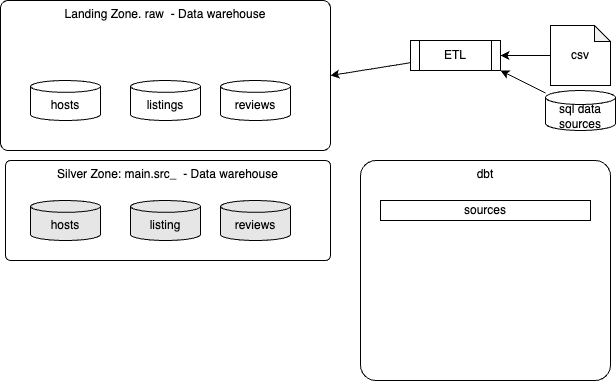
Once created, the second step, is to add dbt sources, then dimensions and facts for the analytics data products.
For a Flink project the ETL may load data to Kafka Topics, then the same logic to process raw records to silver and analytical data products is done using Flink SQLs.
Create silver layer
Sources are defined using a YAML file sources.yml inside your models/ directory.
sources:
  - name: airbnb  # This is the internal dbt name for the source
    schema: raw   # The actual schema name in your warehouse
    tables:
      - name: listings # This is the name of the raw table in the data warehouse
        identifier: raw_listings
Table defined in sources, will be referenced in other SQL models using: {{ source('airbnb', 'listings') }}.
From there, one of the first development step is to process those raw tables to create src tables, which include filtered records, deduplicated, and even with some data transformation like flattening hierarchical columns. The models to do so can be saved in a models/src folder:
The following SQL is a classical deduplication:
WITH ranked_hosts AS (
    SELECT
        *,
        ROW_NUMBER() OVER (
            PARTITION BY id
            ORDER BY updated_at DESC, created_at DESC
        ) AS row_num
    FROM
        {{ source('airbnb', 'hosts') }}
    WHERE id IS NOT NULL
)
SELECT
    id AS host_id,
    name AS host_name,
    is_superhost,
    created_at,
    updated_at
FROM
    ranked_hosts
WHERE
    row_num = 1
So running the following command will create the new table for cleaned records:
which can be validated by opening the duckdb database:
Same may be done for raw_reviews, raw_listings
For source freshness, it is recommended to define refreshness condition on raw tables using a timestamp or date column.
Project structure
dbt recursively scans everything under model-paths (by default models/). dbt run, dbt build, and dbt seed will all find those .sql files and deploy/run them.
The folder structure under the models folder can be a hierarchy based on the kimball architecture or star schema, with folder name to map table under consideration, see the PM methodology chapter for details:
models/
  sources/
    hosts/
      src_hosts.sql
    listings/
      src_listings.sql
  dimensions/
    hosts/
      dim_hosts_cleansed.sql
  facts/
    reviews/
      fct_reviews.sql
dbt names a model from the file name, not from the folder path.
- For
models/src/src_hosts.sqlthe model name issrc_hosts - Use
ref('src_hosts'), notref('src.hosts.src_hosts')
So if two subfolders both contain a model.sql, you get a name collision, therefore it is recommended to use distinct filenames (dim_hosts.sql, fct_reviews.sql), or set an explicit alias in config.
- For incremental deployment it should be possible to run
dbtas:
Materializations
There are four possible materializations for a model:
- View: this is a lightweight representation of the data, not reused. no recreation of the table at each execution.
- Table: reusable data in external table, recreated at each run
- Incremental: fact tables appends to tables - more like event data - table is not recreated each time.
- Ephemeral (CTEs): aliasing of the data and filtering data. Not advertized in the data warehouse. For example all the sql under the
srcmay become CTEs
Materialization can be set globally in the dbt_profile.yaml: all models are views, except in the dimensions folder where there are tables:
Also it is possible to define at the model level the materialization using the config() function:
- Create dimensions folder, add sql with config:
Incremental
Each time dbt runs, the tables will be recreated in the data warehouse. But Fact tables may be kept and the dml can run to continue processing only new records. To do so we need to specify the materialization to be incremental. We also want to stop the dml if schema is changed, for that we add conditions: on_schema_change='fail'.
{{
  config(
    materialized = 'incremental',
    on_schema_change='fail'
    )
}}
WITH src_reviews AS (
  SELECT * FROM {{ ref('src_reviews') }}
)
SELECT * FROM src_reviews
WHERE review_text is not null

{% if is_incremental() %}
  AND review_date > (select max(review_date) from {{ this }})
{% endif %}
Finally we need to specify how dbt should increment records in this fact table: this is done by adding jinja template condition to test if dbt run in incremental mode. Therefore condition could be added on one of the column like the review_date. It needs to be after the last record in the fct_reviews table () '{{ this }}'.
-
Executing
dbt runwith the fct_reviews in incremental view will take care of new records added to theraw_reviewslike:then rerun dbt, the new records will be added as last record in the fct_reviews.
-
To rebuild everything, make a full-refresh:
-
With the src as ephemeral the output of
dbt runbecomes:23:16:16 1 of 4 START sql table model DEV.dim_hosts_cleansed ............................ [RUN] 23:16:18 1 of 4 OK created sql table model DEV.dim_hosts_cleansed ....................... [SUCCESS 14111 in 1.93s] 23:16:18 2 of 4 START sql table model DEV.dim_listings_cleansed ......................... [RUN] 23:16:20 2 of 4 OK created sql table model DEV.dim_listings_cleansed .................... [SUCCESS 17499 in 2.47s] 23:16:20 3 of 4 START sql incremental model DEV.fct_reviews ............................. [RUN] 23:16:23 3 of 4 OK created sql incremental model DEV.fct_reviews ........................ [SUCCESS 0 in 2.37s] 23:16:23 4 of 4 START sql table model DEV.dim_listings_with_hosts ....................... [RUN] 23:16:24 4 of 4 OK created sql table model DEV.dim_listings_with_hosts .................. [SUCCESS 17499 in 1.58s] 23:16:24 23:16:24 Finished running 1 incremental model, 3 table models in 0 hours 0 minutes and 9.83 seconds (9.83s). -
dbt compiledoes not deploy to the target data warehouse
Incremental strategies
| mode | pros | cons |
|---|---|---|
| append | simplest. fully transparent logic | no duplicate checks |
| merge | idempotent. updates existing records | slower, require unique key |
| delete+insert | works for data warehouse without merge. | two operations. require unique key |
| insert+overwrite | fast for partitioned tables | requires partitioned table. Replaces the whole partitions |
This is set in the config() element.
  {{
    config(
      materialized = 'incremental',
      on_schema_change='fail',
      incremental_strategy='merge',

      )
  }}
Type-2 slowly changing dimensions
The goal is to keep history of changes to the records over time and not just the last record per key. dbt adds dbt_valid_from and dbt_valid_to columns to mark each records to be valid for a from and to times. A current correct records have dbt_valid_to sets to null.
There are two strategies for assessing data changes:
- Timestamp: a unique key and updated_at fields is defined at the source model. These columns are used for determining changes.
- Check: any changes in a set of columns (or all columns) will be picked up as an update.
-
snapshots live in the
snapshotfolder and are used for tracking changes. To create snapshots we need a yaml file under thesnapshotfolder: -
the
dbt snapshotwill create a new table with the columns added for the referenced table.00:04:36 1 of 1 START snapshot DEV scd_raw_listings ..................................... [RUN] 00:04:40 1 of 1 OK snapshotted DEV.scd_raw_listings ..................................... [SUCCESS 17499 in 3.44s]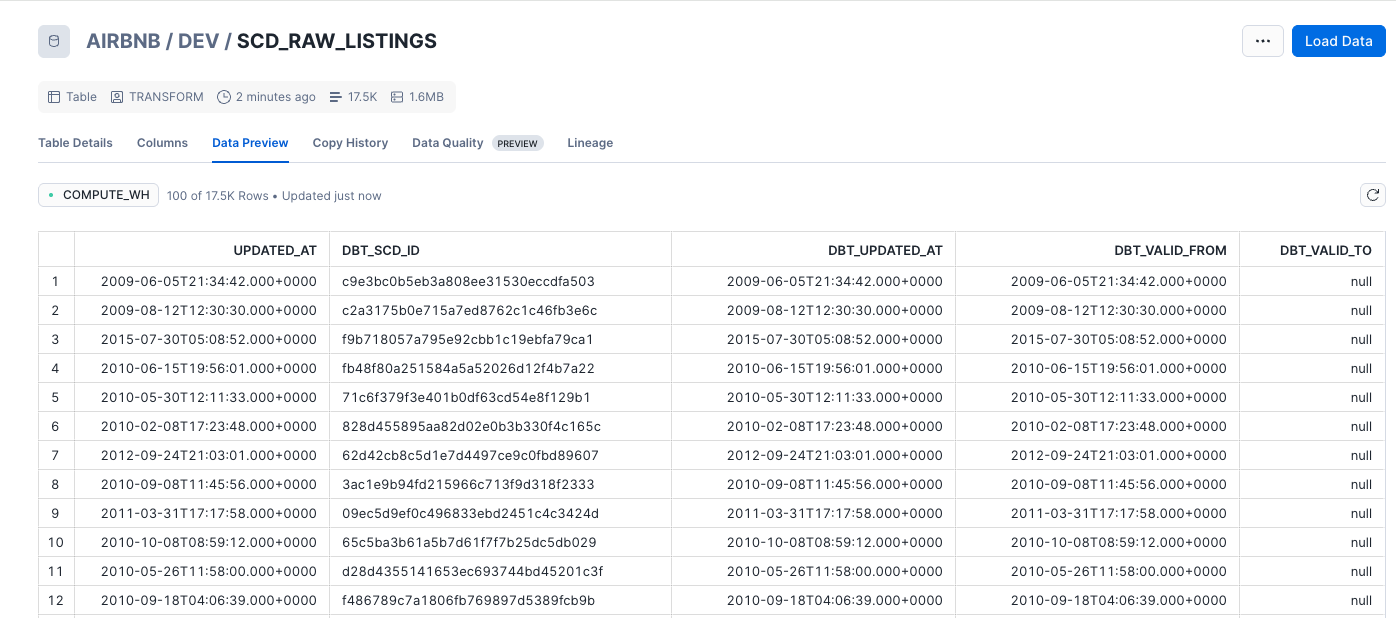
-
An update to an existing record and a new
dbt snapshotwill create historical record.
Tests
-
Two types of tests:
- Unit Tests
- Data Tests: run on actual data
-
There are two types of data tests: singular (SQL queries stored in tests) and generic
-
Defining test is by adding a
schema.yamlwithdata_testsconditions on table. See example in models folder -
To run the tests
-
For unit test, we can define a yaml file at the same level as the SQL under validation. See unit_test.yaml, then run:
Confluent Cloud Flink Specifics
Confluent has developed two Python modules: dbt-confluent (adapt dbt-core to confluent cloud) and confluent-sql (Python DBAPI V2 Compatible driver to be able to run snapshot, streaming queries with different cursors).
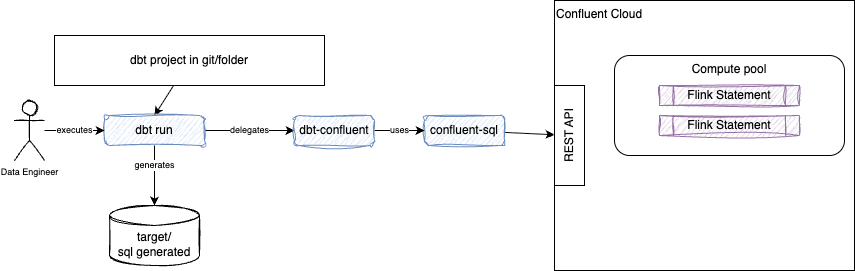
In Confluent Cloud for Flink context, the dbt run does not process data; it deploys or updates the definition of a continuous dataflow to the streaming engine. User runs dbt run only when the SQL queries changes.
Read the getting started and installation in Confluent cloud product documentation on dbt. Some information of the dbt init step:
- It creates a
$HOME/.dbt/profiles.yamlwith the connection to Confluent Cloud, kafka cluster name -
It creates the project folders to manage artifacts. But those are high level and we need other tool to apply naming conventions and good repository structure.
-
A
dbtschema is a Flink database, while adbtdatabase is a Flink Catalog, and finally adbtidentifier is a Flink Table. Thedbnamefield inprofiles.ymlactually refers to a Kafka cluster name. -
The profiles.yaml define a set of connection to different environment and compute pools. Below is an example of connection definition in a
$HOME/.dbt/profiles.yaml:Some error messages reference "schema" when they mean "Kafka cluster/database". It is confusing to set the environment_id where is Confluent Cloud the environment name is used. Usecc_flink: outputs: dev: cloud_provider: aws cloud_region: us-west-2 dbname: j9r-kafka environment_id: '{{ env_var(''ENVIRONMENT_ID'') }}' execution_mode: streaming_query flink_api_key: '{{ env_var(''FLINK_API_KEY'') }}' flink_api_secret: '{{ env_var(''FLINK_API_SECRET'') }}' organization_id: '{{ env_var(''ORGANIZATION_ID'') }}' threads: 1 type: confluent target: devendpoint: https://flink.us-east-2.aws.private.confluent.cloudwhen using private network, and in this case remove cloud_provider and cloud_region. -
The
dbtmapping for dbt Confluent is as follow:Dbt construct CC Flink dbt confluent materialization view create view .. as select view table CTAS snapshot query streaming_table streaming query with DDL and insert streaming_table Flink connector-backed source tables, or existing kafka topic streaming_source materialized table incremental not-supported ephemeral not supported seeds CREATE TABLE + INSERT VALUES (point-in-time) seed (default) -
The dependencies are managed by using the
ref()orsource()functions as core dbt does. The deployment follows a topological order. - Re-running
dbt runagainst an existingtable,streaming_table, orstreaming_sourcedoes not re-create it. --full-refreshdrops the Kafka topic, and create everything. But the downstream statement keeps reportingRunningwith zero exceptions while consuming nothing.- Using a select with '+' postfix will rebuild the current statement and its children.
- Re-submitting an append-mode INSERT that replays from earliest, against a table deliberately not dropped, will create duplicates
- Existing Kafka topics created outside of Flink statements can be reused and referenced with:
when declared within a sources.yaml file as:
name at the source level may represent a reference to an environment in profile.yaml, while schema is to reference the name of the Kafka cluster where the topic is, and tables.name is the topic name. Organize code repository
We propose to adopt two types of project organization:
-
kimball with data product.
-
data product with star schema
The common parts include:
- a
docsfolder for future documentation IaCfor terraform content to declare compute pool, service account, api keys and secretstoolsfor future scripts and other toolspipelinesto includes the different dbt constructssl_dbt.ymla metadata file used by the shift left dbt tool
Naming convention
- It is recommended to apply some table and statement naming convention
- Use statement name property in the config to control the name of the statement, specially during development as external tool can stop and delete running statement and drop tables to clean a dev environment.
Organize table and tests
The project management for dbt based project is now in a separate chapter
Useful commands to remember
- Compile dbt models to Flink SQL to review
Compiled statements are in target/compiled folder
- run a specific model:
- run all models in a specific directory:
- understand downstream impacts
Results from the airbnb_streaming:
airbnb_streaming.user_reviews.dimensions.dim_listings_cleansed
airbnb_streaming.user_reviews.dimensions.dim_listings_with_hosts
airbnb_streaming.user_reviews.facts.fct_host_performance
airbnb_streaming.user_reviews.facts.fct_listing_activity
airbnb_streaming.user_reviews.facts.fct_listing_pricing
airbnb_streaming.user_reviews.sources.src_listings
-
List all models upstream of fct_revenue
Results from the airbnb_streaming: -
List a model and everything upstream and downstream
Results from the airbnb_streaming:airbnb_streaming.user_reviews.facts.fct_host_performance airbnb_streaming.user_reviews.facts.fct_listing_activity airbnb_streaming.user_reviews.facts.fct_review_summary airbnb_streaming.user_reviews.facts.fct_reviews airbnb_streaming.user_reviews.sources.src_reviews source:airbnb_streaming.raw_reviews.raw_reviews -
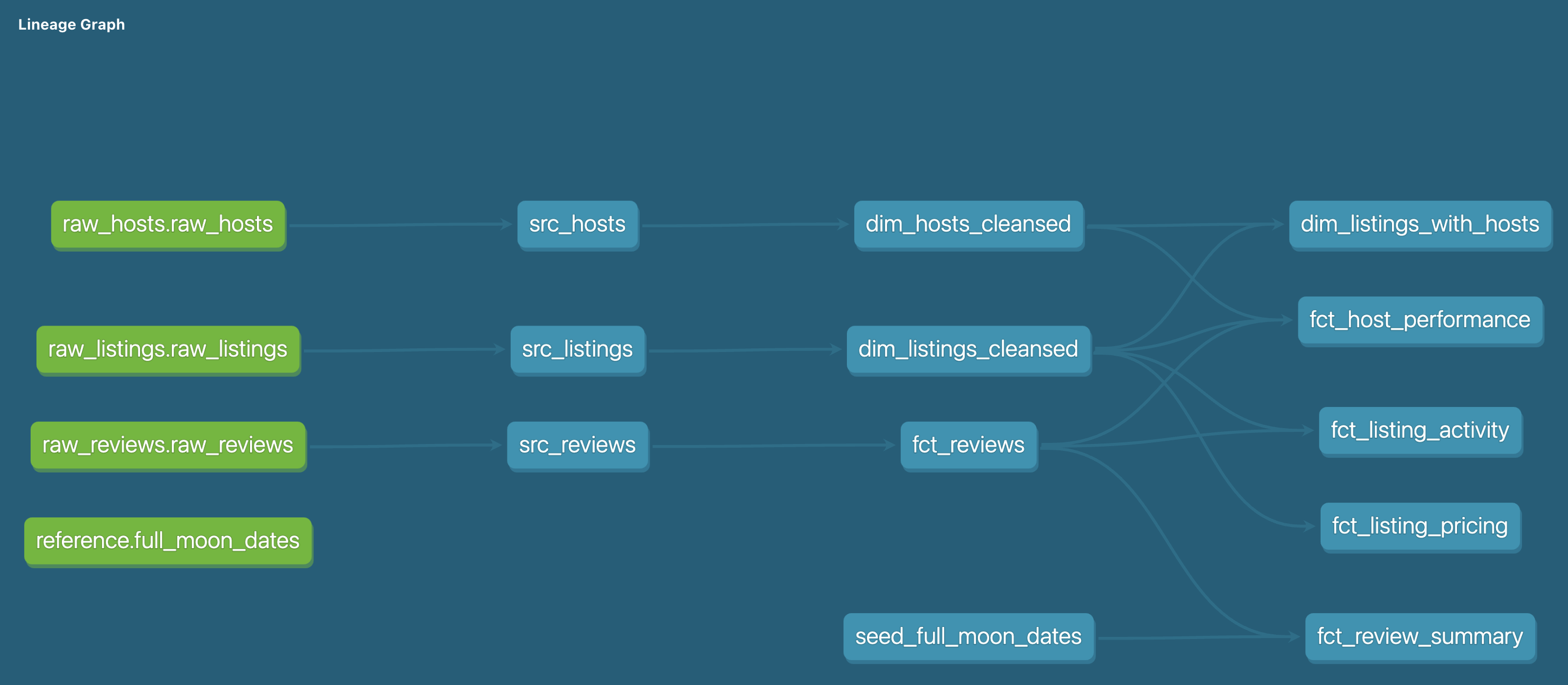
Generate docs and see it in web browser, see lineage graph.
-
Run unit tests
Constraints
- dbt has no cascade, it will not propagate dowstream modification: --full-refresh is a global invocation flag. If we need to change downstream we need to be explicit by selecting the children of the modified intermediate statement
- The support of v2 table, needs to be done manually
Testing
See Confluent documentation for testing definition and dbt testing.
- It is possible to define tests at the flink statement model level. Data engineer can define mock input data and validate output to expected values. This unit test definition can be added to the yml file that defines the columns contract or as a separate
_unit_tests.yml. - Only unit test models that contain complex business logic
- Only include the specific columns relevant to the business logic you are validating. dbt automatically fills in missing columns with null values or infers them from your schema
- If you version your models (e.g., v1, v2), use the versions: tag inside your unit test block to target specific versions so older logic test configurations do not break newer iterations
How to
How to define distribution keys for kafka partitions?
{{
  config(
    materialized='streaming_table',
    distributed_by={
      'columns': ['order_id'],
      'buckets': 4
    }
  )
}}
The column need to have aprimary constraint, this should be added to the schema.yaml
  - name: order_id
      data_type: BYTES
      constraints:
        - type: not_null
        - type: primary_key
          expression: not enforced
or when there are multiple key to distributed on:
Creating table with inserted data for raw sources
This could be valuable to create raw tables for testing and start a pipeline. INSERT INTO ... VALUES will not work. Follow the following pattern: See an example
How to define an existing topic as source?
A Kafka topic may exist as raw data, output of a CDC connector for example. Define the table as a source (models/sources.yml):
- name: raw_listings
  schema: j9r-kafka -- kafka cluster name in CC
  tables:
    - name: raw_listings
- name: raw_hosts
  schema: j9r-kafka
  tables:
    - name: raw_hosts
- name: raw_reviews
  schema: j9r-kafka
  tables:
    - name: raw_reviews
Then add columns definition matching the schema definition from the topic.
  - name: raw_listings
    schema: j9r-kafka
    tables:
      - name: raw_listings
        columns:
          - name: id
            data_type: string
          - name: name
            data_type: string
          - name: listing_url
            data_type: string
          - name: room_type
            data_type: string
          - name: minimum_nights
            data_type: int
          - name: host_id
            data_type: string
          - name: price
            data_type: string
          - name: created_at
            data_type: string
          - name: updated_at
            data_type: string
+materialized: streaming_table set , it triggers the Confluent macro materialization_streaming_table_confluent which calls assert_columns_equivalent. Finally add for each Flink statement that will create sink record, a yaml definition for the columns name and type. For example a file named src_hosts_models.yaml:
models:
- name: src_hosts
  config:
    contract:
      enforced: false
  columns:
    - name: host_id
      data_type: varchar(2147483647)
    - name: host_name
      data_type: varchar(2147483647)
    - name: is_superhost
      data_type: varchar(2147483647)
    - name: created_at
      data_type: varchar(2147483647)
    - name: updated_at
      data_type: varchar(2147483647)
How to specify compute pool?
Setting a default compute pool is set in the connection definition in profile.yml. It is possible to define this at the model level using compute_pool in config element.
Seed reference data on Confluent Cloud for Flink
The airbnb_streaming project loads small reference CSVs into Flink tables with dbt seed. The dbt-confluent adapter infers column types from the CSV (via agate) and issues CREATE TABLE followed by INSERT INTO ... VALUES. Override types in seeds/seeds.yml when inference is too coarse (e.g. map date strings to DATE).
# seeds/seeds.yml (dbt properties format)
version: 2
seeds:
  - name: seed_full_moon_dates
    config:
      alias: raw_full_moon_dates
      column_types:
        full_moon_date: DATE
Set +execution_mode: snapshot on seeds in dbt_project.yml so DDL and INSERT run as point-in-time statements (not streaming queries). Seeds are limited to 10,000 rows per file.
Optionally run make seed to regenerate seeds.yml column types from CSV headers before seeding.
How to specify table properties?
Use the config function, and the with proiperties section as json.
How to define primary key for non source tables?
This is done in the schema.yml file. For a column:
or as combined keys set with external contraints:How to define materialized table
Add the config element in the model file
Define seed and reference it?
Seed can be set from csv files.
Private networking / using endpoint
For private networking it is recommended to set the endpoint parameter in the profile.yml. In this case you need to remove the prodiver and region:
cc_flink:
outputs:
  dev:
    endpoint: https://flink....aws.private.confluent.cloud
    compute_pool_id: lfcp-11p88z
    dbname: j9r-kafka
    environment_id: '{{ env_var(''ENVIRONMENT_ID'') }}'
    flink_api_key: '{{ env_var(''FLINK_API_KEY'') }}'
    flink_api_secret: '{{ env_var(''FLINK_API_SECRET'') }}'
    organization_id: '{{ env_var(''ORGANIZATION_ID'') }}'
    statement_label: dbt-confluent
    statement_name_prefix: dbt-
    threads: 1
    type: confluent
NullConverter error
The error is: "NullConverter cannot convert Python None to statement string directly. Use AnnotatedNull to specify the desired SQL type for NULL parameters."
The error NullConverter cannot convert Python None to statement string directly. Use AnnotatedNull to specify the desired SQL type for NULL parameters is thrown by dbt's seed compiler when it encounters an empty CSV cell (representing NULL) and cannot determine the SQL type to annotate it.
strange error reported on duplicate entry in a schema.yaml
it's a stale partial-parse cache, not an actual duplicate in your source. The stale cache still has an entry from the old pre-rename project state, and dbt is treating it as a second definition colliding with the current one.Error of column named comment not quoted on a generated SQL not the same as the one defined in the model
1/ the fact that the model does not look the same, is due to every column in the project's schema.yml declares a data_type (plus constraints on the key), dbt treats the model as contract-enforced and runs dbt-core's default__get_empty_schema_sql macro before submitting the real DML — it builds a throwaway cast(null as
2/ Now the comment column in the real SQL is quoted: comment. The macro (dbt/include/global_project/macros/adapters/columns.sql:62) only quotes a column identifier if the schema.yml entry sets quote: true. So the schema.yaml needs to get those changes:
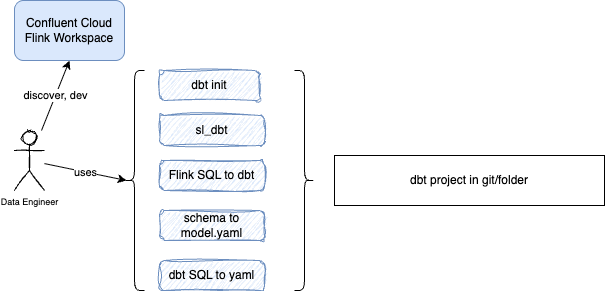
Added tools
The flink-tools-for-agents/tools folder includes a set of useful tools to complement your dbt Confluent project management.
| Tool | Goal | Usage |
|---|---|---|
| sl_dbt.py | Manage your project from batch to dbt and Flink SQL. (shift_left) | sl_dbt init <project_root>, sl_dbt add-data-product <data_product>, sl_dbt.py add-table crm-analytics src_customers c360 --table-type dim |
| sql_to_dbt_yaml.py | parses a dbt SQL model file and emits a ready-to-paste models: YAML block, resolving column names and data types entirely from the SQL and the upstream model / source definitions in the project | uv run sql_to_dbt_yaml.py ../airbnb_streaming/models/user_reviews/dimensions/dim_listings_with_hosts.sql |
| flink_dbt_migrate | Taking one or more Flink SQL queries in the form of ddl, dml or ctas and transform them for dbt processing | flink_dbt_migrate.migrate_dml_to_dbt ../cc-flink/dml.enriched_orders.sql ../cc_dbt/models/intermediates/enriched_orders |
| statement_management.py | help to stop and delete statements created by dbt |
Flink SQL Demos using dbt
- Jan's flink workshop ported to dbt
- Research on PTF
- wd-flink-demo
- Airbnb streaming
- Streamhouse demonstration
- Tools to manage a Flink project on top of dbt
- Tool to help migrate Flink ddl and dmls to dbt model
Sources of Information
- Udemy training from Zoltan C. Toth with Git Repo. Example of data from Inside AirBnB.
- Dbt core
- Learn more about dbt in the docs
- Preset is a SaaS for Apache Superset to develop BI dashboard, on cloud with dbt integration. It also includes a SQL Editor.
- Snowflake username: jbcodeforce. Using key-pair authentication. Public key in Snowlflake
- Youtube tutorial
- Patrick Neff's git repo: Stream Processing in Confluent Cloud Flink with data build tool (dbt)
- Check out Discourse for commonly asked questions and answers
- Check out the blog for the latest news on dbt's development and best practices