Claude Code
Updates
03/17/2026
An agentic coding assistant which not only addresses coding, but also discovery and design.
The architecture of the assistant looks like:
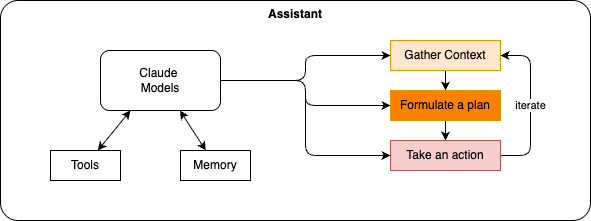
- CLAUDE.md file represents memory across sessions. It can include style guidelines and common commands. This file is automatically loaded into the context.
- See overview for installation and getting started.
- Claude Code offers a variety of settings to configure See the settings article. See also ~/.claude/settings.json
Capabilities
- Conversation history is stored locally, which is loaded into context.
- Can launch sub-agents
- Manage to dos
- Refer back to previous information
- Agentic search
- A marketplace is a collection of plugins that can be installed into Claude Code. Plugins extend Claude Code's capabilities with company-specific knowledge, tools, and workflows.
- Plugins can contain skills, hooks, agents and commands.
Integrating with existing git repo.
Here are 3-step playbook for getting Claude Code productive and safe on existing repos.
- Create a first CLAUDE.md file. Don't use /init as-is — it produces bloated output. As good practices:
| Include | Exclude |
|---|---|
| Shell commands LLM can't guess | Anything LLM can figure out from code |
| Code style rules that differ from defaults | Standard language conventions |
| Testing instructions and preferred runners | Detailed API docs (links to existing content instead) |
| Architectural decisions specific to your project | Long explanations or tutorials |
| Common gotchas or non-obvious behaviors | File-by-file codebase descriptions |
- Adopt TDD
- Plan First, then Scale with skills and plugins.
- Planning is most valuable when you're uncertain about the approach or the change spans multiple files. Ctrl-G to update the plan.
- Prefer CLIs over MCP
- Leverage plugin like Superpowers
- Manage context aggressively — Use /clear between unrelated tasks, /compact to summarize mid-session, and subagents for investigation
Useful prompts
| Goal | Prompt |
|---|---|
| Fix build issue | The build fails with this error: [paste error]. Fix it and verify the build succeeds. Address the root cause, don't suppress the error. |
| Fix runtime issue | Use subagents to investigate why [service] is throwing [error]. Check logs and recent changes. |
| Code review | Read ... folder, What are the key files and flows? |
| Build new feature | I want to build [brief description]. Interview me about edge cases, tradeoffs, and implementation using AskUserQuestion. Then write a spec to SPEC.md |
| Review PR (collaborate on PR) | Review the PR at [link]. Look for edge cases, race conditions, and consistency with existing patterns |
| Address PR feedback | Read the review comments on PR #[number]. Address each one, reply to the threads, and push fixes. |
Commands
| commands | Role |
|---|---|
| /init | analyze a repo and create CLAUDE.md |
| /clear | At ~40% context usage, expect small inconsistencies. At ~70%, expect bigger mistakes. Use /clear between unrelated tasks |
| /models | Select a model |
Running Claude with Google Vertex/AI
Be connected to VPN (GlobalProtect or Twingate)
gcloud auth application-default login
claude
claude  --model=claude-haiku-4-5
# Prefer opus for coding
Running with Local LLM
- Create a file named Modelfile
- Create the optimized version
- Start claude:
This will be slow and will have some challenge with the plan model of Claude and gemma4.
Wiki LLM
See the core principles. See techno/claude/llm-wiki.md