IBM Bob best practices
Updates
08/26/2026
IBM Bob is an IBM AI coding assistant built on top of different LLM models. It operates inside VS Code and offers three specialized modes, a skill system, MCP extension, and a 270k-token context window.
Modes
Bob comes with three built-in modes. Selecting the right one for the task avoids wasted tokens and produces sharper output.
| Mode | Purpose | Tools available |
|---|---|---|
| Agent | Write, modify, and refactor code — fix bugs, implement features, run commands | Full: Read, Edit, Execute, MCP, Skill, Todo, Subtask, Subagent, Mode |
| Plan | Design before implementation — architecture, specs, task breakdown | Read, Edit, MCP, Skill, Subagent, Mode (no Execute) |
| Ask | Understand code or concepts without touching files | Read, MCP, Skill, Subagent, Mode (read-only) |
Mode selection strategy
- Start in Plan mode for new projects or complex features. Read the plan carefully before proceeding. It is possible to persist the plan and iterate until it fits the goals.
- Switch to Agent mode when you are ready to implement. Bob can make the transition autonomously once the plan is approved.
- Use Ask mode to explore the codebase, understand patterns, or get explanations — without the risk of accidental edits.
Switch modes with ⌘ + . (macOS) or Ctrl + . (Windows/Linux), or via the dropdown to the left of the chat input. Bob may suggest a switch autonomously when the work evolves.
Prompting effectively
"Create a React component that displays a sortable table of user data" works better than "Make me a table component."
For simple requests
- State what to do and what to avoid.
- Reference specific files with
@mentions (e.g.,@src/api/client.ts). - Include the exact error text when fixing a bug, and ask Bob to address the root cause rather than suppress the symptom.
For complex requests
- Provide a clear overview of the goal.
- Include relevant background context — constraints, existing patterns, non-goals.
- Break the task into logical steps in the prompt itself.
- Use
@mentions to anchor Bob to the right files immediately. - Review Bob's responses and give feedback to refine.
Useful prompt templates
| Goal | Prompt |
|---|---|
| Fix a build error | The build fails with: [paste error]. Fix it and verify the build succeeds. Address the root cause, don't suppress the error. |
| Fix a runtime error | Use subagents to investigate why [service] is throwing [error]. Check logs and recent changes. |
| Understand the codebase | Read [folder]. What are the key files and flows? |
| Design a new feature | I want to build [description]. Interview me about edge cases, trade-offs, and approach using AskUserQuestion. Then write a spec to SPEC.md. |
| Review a PR | Review PR #[number]. Look for edge cases, race conditions, and consistency with existing patterns. |
| Address PR feedback | Read the review comments on PR #[number]. Address each one, reply to the threads, and push fixes. |
Context window management
Bob's context window is 270,000 tokens per task. Everything counts: system prompt, rules, skills, file reads, and conversation history. Once full, old content is summarized or dropped — quality degrades.
What fills the window
| Category | When it grows |
|---|---|
| System prompt + Tool definitions | Fixed at task start |
Rules (AGENTS.md, .bob/rules/) | Fixed at task start |
| Skills | When Bob activates a skill mid-thread |
| Messages | Every prompt, reply, file read, tool output, and @ mention |
Messages is almost always the biggest category in long sessions. Watch the token usage indicator (top-right of the chat panel) and click it to see the breakdown.
Agentic Loop
From the prompt engineering done 2 years ago, to context engineering (system rules, history, ) to agent loop. The agent loop reasons, acts, observes, updates state, evaluates results, and involves humans when needed.
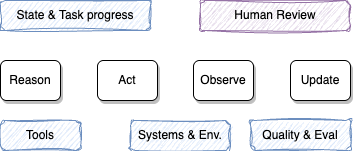
- The context includes rules, AGENTS.md, skill list, MCP tools.
- And messages: user prompt, agent responses, tool results and loaded @ files
- Hooks to add some deterministic context and control are supported by agent like Bob
Best practices
- One task per work goal. Click
+(New task) when the topic changes — carrying unrelated history adds cost and can confuse Bob. A good task contains fgour things: the what, where, done, limits. - Scope before exploring. State the goal, expected outcome, and constraints before asking Bob to read files. Name files and functions explicitly; avoid vague prompts like "read the whole repo".
- Keep standing context lean.
AGENTS.mdand rule files should contain only commands Bob cannot guess (build commands, test runners, style rules). Remove verbose tutorials or file-by-file descriptions. - Add context only when needed: do not attach a full project. Use the path: Find -> Look -> Plan → Change → Check, where each step slightly enriches the next slice of context.
- Use subagents for repo-wide reads. Subagents return a summary rather than dumping every tool step into
Messages, keeping the parent context clean. Use prompt: Spawn Explore subagent to get a sub-agent to search and summarize. The summary is sent back to the task. - Disconnect unused MCP servers and skills. Fixed categories still consume tokens even if you never call those tools.
- Reset when stuck. If Bob starts producing repetitive or drifting output, start a new task rather than continuing to prompt corrections into a poisoned context.
- Restate the must-keeps after a reset: summary of what is done. Keep in file.
- Use the lightest mode that can do the job. Save plan on disk. Example of prompt: 'write our plan to plan.md with a short checklist'. Later in a new task use: '@plan.md, implement cheklist item 2 only. Update progress.md when done`
Context poisoning symptoms
- Suggestions repeat or wander from the actual repo.
- Tool calls no longer match what was asked.
- A corrective prompt helps once, then the problem returns.
Recovery: Start a new task with +, paste only the relevant log lines or code snippet Bob needs, and re-scope the goal.
Project setup: AGENTS.md and rules
AGENTS.md
Run /init to generate an AGENTS.md file at the project root and mode-specific variants under .bob/. Bob automatically loads this into every new conversation.
Good content for AGENTS.md:
| Include | Exclude |
|---|---|
| Build/test/lint commands | Standard language conventions |
| Non-obvious architecture decisions | Detailed API docs (link instead) |
| File structure and naming patterns | Long tutorials or explanations |
| Common gotchas | File-by-file codebase descriptions |
Custom rules
Create markdown files under .bob/rules/ for rules that apply to all modes, or under .bob/rules-{mode}/ for mode-specific rules:
.bob/
  rules/               # applied to all modes
    coding_standards.md
  rules-agent/         # only in Agent mode
    test_requirements.md
  rules-plan/          # only in Plan mode
    architecture_guidelines.md
Rules are loaded at task start and count against the fixed context budget — keep them short and operational.
Useful rules patterns:
Always include concise JSDoc strings for every public function.
Be very concise in your wording.
Write a summary of every interaction into internal-monologue/ with a timestamp prefix.
The "internal monologue" pattern creates an audit trail that persists across sessions and gives Bob cross-session continuity.
Skills
Skills are reusable instruction sets stored as SKILL.md files. Bob activates them automatically based on the task description.
Locations
| Path | Scope |
|---|---|
<project>/.bob/skills/<name>/SKILL.md | Project-specific |
~/.bob/skills/<name>/SKILL.md | Global / personal |
Project-level skills take precedence over global ones with the same name.
SKILL.md format
---
name: code-review
description: Review code for bugs, security issues, and best practices
---

When reviewing code, check for:
- Security vulnerabilities (OWASP Top 10)
- Performance bottlenecks
- Missing error handling at API boundaries
- Unused imports and dead code

Provide a summary with severity levels for each finding.
The description field is critical — Bob uses it to decide when to activate the skill. A vague description causes the skill to be ignored.
Tips
- Single responsibility: one skill per specific task type.
- Keep
SKILL.mdconcise: move detailed reference material into companion files in the same folder. - Version-control project skills so the whole team benefits.
- Enable auto-approve for skills in Settings → Auto-Approve if the skill's actions are low risk.
- Use the Skills tab in Bob Settings to verify which skills are loaded.
MCP servers
MCP (Model Context Protocol) extends Bob with custom tools: database queries, external APIs, internal services, and more.
- Configure servers under Settings → MCP.
- Use the Bob Marketplace for community-contributed servers (monday.com, product knowledge bases, etc.).
- Prefer project-scoped MCP configuration over global to avoid loading unnecessary tools in every workspace.
- Enable per-tool
Always allowonly for tools whose side-effects are well understood.
Security and auto-approve
Auto-approve bypasses confirmation prompts. Use it carefully.
| Action | Risk | Recommendation |
|---|---|---|
| Read | Low | Safe to auto-approve |
| Write (file edits) | Medium | Auto-approve on dev branches only |
| Execute (terminal) | High | Keep manual; define an allow-list of trusted commands |
| MCP | Varies | Enable per-tool only |
| Skills | Low–Medium | Safe to auto-approve when skill behavior is known |
Guidelines:
- Start restrictive — add permissions only as needed.
- Disable auto-approve entirely when working with sensitive code or production systems.
- Review what Bob has done periodically, especially file modifications.
- Never auto-approve in production environments.
Subagents
Bob spawns subagents for isolated, self-contained work. A subagent runs in its own context window and returns a summary — keeping the parent conversation clean.
Bob uses subagents only when all of the following are true:
- The task is clearly self-contained and only a summary is needed back.
- It would add significant irrelevant content to the main context.
- It cannot be done with one or two direct tool calls.
Two types:
| Type | Model | Access |
|---|---|---|
explore | Lighter | Read-only codebase exploration |
general | Default | Full tool access |
Set fork_context: true when the subagent needs prior conversation decisions or constraints.